AI Tools for Small Business Customer Emails: 12 Ways to Save Time and Improve Customer Service
Customer email can quickly become one of the biggest time-consuming tasks for a small business.
A single inbox may contain product questions, appointment requests, complaints, refund requests, quote inquiries, order updates, follow-ups, and general questions. When the same person is responsible for sales, operations, customer service, and administration, answering every message manually can become difficult.
This is where AI tools for small business customer emails can help.
Modern AI email tools can do much more than generate a polished sentence. Depending on the software, they can summarize long conversations, draft replies, improve tone, identify customer intent, suggest responses, organize conversations, retrieve information, automate repetitive support tasks, and help create marketing emails.
The key is choosing an AI tool that solves your actual email problem rather than simply choosing the tool with the longest feature list.
What Are AI Tools for Small Business Customer Emails?
AI tools for customer emails are software applications that use artificial intelligence to help businesses manage, write, organize, personalize, or automate email communication.
Some tools work directly inside Gmail or Outlook. Others are built into customer-service platforms, CRM systems, email marketing platforms, or shared inboxes.
Depending on the product, an AI email tool may help with:
- Writing customer replies
- Summarizing long email threads
- Rewriting messages
- Changing tone and length
- Answering repetitive customer questions
- Finding information in previous conversations
- Creating marketing emails
- Personalizing customer communication
- Categorizing customer inquiries
- Routing emails to the right team member
- Following up with customers
- Automating routine support requests
This means “AI email tool” can refer to several different types of software.
Why Small Businesses Are Using AI for Customer Emails
Small businesses often have limited staff and limited time.
Email creates another challenge because customer expectations are high. People generally want quick answers, but writing a thoughtful response still takes time.
AI can help reduce the amount of repetitive work involved.
For example, instead of manually writing:
“Thank you for contacting us. We received your request and will review the issue…”
an AI assistant can create a first draft based on the customer’s message.
The employee can then check the information, personalize the response, and send it.
This creates a useful model:
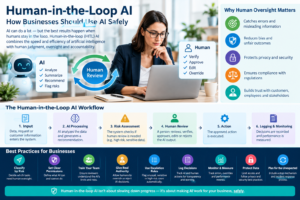
AI handles repetitive drafting → human reviews the response → customer receives a personalized answer.
For many small businesses, this is more practical than trying to automate every customer interaction.
12 Ways AI Can Help With Small Business Customer Emails
1. Draft Customer Replies
One of the simplest uses of AI is generating a first draft.
Suppose a customer asks:
“Do you have this product available, and how long will delivery take?”
Instead of starting from a blank email, an AI assistant can create a response based on the information you provide.
The employee can then verify:
- Product availability
- Pricing
- Delivery time
- Customer name
- Relevant policies
This can make routine replies much faster.
Best for:
- Product questions
- Appointment requests
- Basic inquiries
- Quote requests
- Follow-ups
- General customer communication
The important point is that AI-generated text should be treated as a draft, not automatically assumed to be correct.
2. Summarize Long Customer Conversations
Customer email threads can become surprisingly long.
A customer might send five messages, your employee might respond three times, and another team member may add additional information.
Instead of reading the entire conversation before responding, AI can summarize the important information.
A useful summary might identify:
- What the customer wants
- What has already been discussed
- What the business promised
- What remains unresolved
- What action is required next
Google’s Gemini in Gmail and Microsoft’s Copilot in Outlook both offer email-thread summarization capabilities.
This is particularly useful when employees need to take over a conversation from someone else.
3. Improve Email Tone
The information in an email may be correct but still sound too formal, too casual, too aggressive, or too vague.
AI can help rewrite a message for a particular tone.
For example, you could ask it to make an email:
- More professional
- Friendlier
- Shorter
- More empathetic
- More direct
- Easier to understand
Microsoft Copilot, for example, provides controls for changing the tone and length of generated drafts.
This can be particularly useful when responding to frustrated customers.
However, don’t allow AI to remove the human element from sensitive conversations.
A customer complaining about a serious problem may need empathy and judgment rather than a generic automated response.
4. Create Personalized Customer Emails
Personalization is one of the biggest advantages of using AI with customer communication.
Instead of sending the same generic response to everyone, AI can help adapt the message to the situation.
For example:
Generic:
“Thank you for contacting us. We will respond soon.”
More personalized:
“Hi Sarah, thanks for reaching out about your replacement order. I checked the details you provided, and our team is reviewing the shipment status.”
The second message feels more relevant because it addresses the customer’s specific situation.
AI can help create that first draft, but businesses should make sure the underlying customer information is accurate before sending it.
5. Handle Repetitive Customer Questions
Many small businesses receive the same questions repeatedly.
For example:
- What are your opening hours?
- Do you offer refunds?
- How long does delivery take?
- How can I change my appointment?
- Where is my order?
- Do you offer international shipping?
- What payment methods do you accept?
These questions are ideal candidates for AI assistance because the answers are usually based on information the business already has.
A knowledge base, FAQ, help center, or approved response library can give AI a reliable source of information.
Some customer-service platforms can use knowledge-base content when assisting agents with replies. Zoho Desk’s Zia, for example, can use knowledge-base information to help draft customer-support responses.
6. Organize Customer Emails
As a business grows, the problem may stop being “How do I write this email?”
Instead, it becomes:
“Which emails should I deal with first?”
AI can help categorize incoming conversations based on their content.
Potential categories include:
- Sales inquiry
- Existing customer
- Refund
- Complaint
- Technical support
- Billing
- Appointment
- Shipping
- Partnership
- Urgent issue
Some platforms can use AI-generated categories or topics to route conversations and organize workflows.
Front, for example, uses AI to analyze customer conversations and identify topics that can then support organization, routing, rules, and analytics.
This can be valuable when several employees share responsibility for customer email.
7. Manage Shared Customer Inboxes
A shared inbox can become chaotic when multiple employees are answering the same customers.
You may encounter problems such as:
- Two employees responding to the same customer
- Nobody responding
- Messages being assigned to the wrong person
- Important conversations getting buried
- Employees repeatedly asking each other for context
AI-enabled shared inbox software can help identify conversations, summarize customer history, generate drafts, and route messages.
Front combines shared inbox functionality with AI features including summaries, draft generation, conversation analysis, and customer-support assistance.
For businesses with multiple people handling customer email, this type of platform can be more useful than a basic AI writing assistant.
8. Follow Up With Customers
A customer may request a quote and then disappear.
Another customer may ask a question that requires information from another employee.
A third customer may say, “I’ll get back to you next week.”
These situations create follow-up tasks that are easy to forget.
AI-powered email workflows can help identify messages that need follow-up and, depending on the platform, assist with creating follow-up drafts or automating parts of the workflow.
However, follow-ups involving money, contracts, complaints, or sensitive customer situations should generally receive human review.
9. Write Marketing Emails
Customer email isn’t limited to one-to-one support.
Small businesses also send:
- Welcome emails
- Promotional campaigns
- Product announcements
- Customer newsletters
- Event invitations
- Seasonal messages
- Re-engagement campaigns
AI can help generate subject lines, email copy, calls to action, and variations of existing content.
Mailchimp currently provides AI-powered email content creation and editing features, including tools that can generate content from prompts and help adjust tone, length, and wording.
Marketing platforms can therefore be a better fit than standalone AI writing tools when the goal is sending campaigns to a customer list.
10. Translate Customer Emails
Small businesses increasingly communicate with customers who speak different languages.
AI can help translate incoming messages and draft responses in another language.
This can make communication easier for businesses that serve international customers.
However, automatic translation should receive additional review when the email involves:
- Legal terms
- Contracts
- Refund disputes
- Medical information
- Financial information
- Technical instructions
A translation that sounds fluent can still contain an important mistake.
11. Analyze Customer Sentiment and Intent
AI can also help businesses understand what is happening inside their inbox.
For example, an AI system may identify whether a customer message appears:
- Positive
- Neutral
- Frustrated
- Urgent
- Sales-related
- Support-related
Zoho Desk’s Zia includes sentiment, tone, and key-topic analysis for customer conversations.
This can help employees recognize potentially difficult conversations before they escalate.
But sentiment analysis should be treated as an aid rather than an unquestionable judgment about a customer’s emotions.
12. Turn Customer Conversations Into Actionable Information
The most useful AI email tools don’t stop at writing.
They can help answer:
What does this customer need, and what should we do next?
For example, an AI system might summarize a conversation into:
Customer: Wants to exchange an order
Problem: Wrong size received
Required action: Confirm replacement availability
Status: Waiting for warehouse confirmation
That type of summary can save employees from repeatedly reading the entire conversation.
Zoho Desk’s AI features include conversation summaries, reply assistance, content analysis, and other tools designed to help support agents understand and respond to tickets.
Best AI Tools for Small Business Customer Emails
There isn’t one AI tool that is ideal for every small business. The right choice depends on where your customer emails are handled and what you need AI to do.
1. Google Gemini in Gmail
Gemini is worth considering if your business already uses Gmail or Google Workspace.
It can help with:
- Drafting emails
- Summarizing conversations
- Suggested replies
- Finding information in emails
- Finding information in connected Google Drive content
- Working with calendar information
Google documents these capabilities as part of Gemini in Gmail.
Best fit: Small businesses already using Gmail or Google Workspace.
2. Microsoft Copilot in Outlook
Copilot is a natural option for businesses built around Microsoft 365 and Outlook.
Its email capabilities include:
- Drafting emails
- Summarizing threads
- Improving drafts
- Adjusting tone and length
- Email coaching
- Working with information available through eligible Microsoft environments
Microsoft’s documentation confirms both email drafting and thread summarization in Outlook.
Best fit: Small businesses using Outlook and Microsoft 365.
3. Zoho Desk with Zia
Zoho Desk becomes more relevant when customer email is functioning as a support operation rather than simply an employee inbox.
Zia provides capabilities such as:
- Reply assistance
- Conversation summaries
- Sentiment analysis
- Tone analysis
- Knowledge-base-assisted responses
- Content analysis
- AI-generated content
Best fit: Small businesses that need structured customer support and ticket management.
4. Front AI
Front is designed around collaborative customer communication and shared inboxes.
Its AI features include tools for:
- Drafting
- Summarizing
- Customer context
- Conversation analysis
- Topic identification
- Translation
- Workflow support
Best fit: Small teams where several employees manage customer conversations together.
5. Mailchimp AI
Mailchimp is different from an AI inbox assistant.
Its strength is marketing communication.
Its current AI tools can assist with:
- Email content
- Editing
- Marketing campaigns
- Personalization
- Automations
- Analytics
Best fit: Businesses that want AI assistance for newsletters, promotional emails, and automated marketing.
6. Grammarly
Grammarly can be useful when your biggest problem isn’t managing the inbox but improving the quality of the emails your team sends.
Its business offering focuses on AI writing assistance, organizational knowledge, and brand voice.
Best fit: Businesses that want employees to produce clearer and more consistent customer communication.
AI Customer Email Tools Compared
| Tool | Best use | Customer support | Email drafting | Marketing email | Shared inbox |
|---|---|---|---|---|---|
| Google Gemini | Gmail productivity | Limited/indirect | Yes | Limited | No |
| Microsoft Copilot | Outlook productivity | Limited/indirect | Yes | Limited | No |
| Zoho Desk + Zia | Customer support | Yes | Yes | Some | Yes |
| Front AI | Shared customer communication | Yes | Yes | Limited | Yes |
| Mailchimp AI | Email marketing | Limited | Yes | Yes | No |
| Grammarly | Writing quality | Indirect | Yes | Indirect | No |
The important distinction is that these tools solve different problems.
A business with one person managing a Gmail inbox may not need a full customer-service platform.
A business with five employees answering hundreds of support emails may need much more than an AI writing assistant.
How to Choose an AI Email Tool for Your Small Business
Before buying anything, identify the actual problem.
If writing takes too long
Choose an AI writing assistant.
Look for:
- Draft generation
- Tone controls
- Rewriting
- Personalization
- Templates
If the inbox is overwhelming
Look for:
- Summaries
- Priority detection
- Search
- Categorization
- Follow-up management
If multiple employees answer customers
Look for:
- Shared inboxes
- Assignment
- Routing
- Internal notes
- Conversation history
- AI summaries
If customer support is the main problem
Look for:
- Ticketing
- Knowledge-base integration
- Suggested replies
- AI self-service
- Automation
- Escalation to humans
If marketing is the main goal
Look for:
- Email campaign creation
- Segmentation
- Personalization
- Automation
- Analytics
- A/B testing
How Much Should a Small Business Automate?
More automation isn’t automatically better.
A useful approach is to divide customer emails into three categories.
Category 1: Safe to automate
Examples:
- Business hours
- Basic FAQs
- Simple order-status information
- Appointment confirmations
- Routine notifications
Category 2: AI draft + human review
Examples:
- Refund requests
- Product recommendations
- Pricing questions
- Complaints
- Complex technical questions
- Sales inquiries
Category 3: Human handling
Examples:
- Legal disputes
- Highly sensitive complaints
- Security incidents
- Major financial issues
- Threats or abusive situations
- High-value customer escalations
This approach allows AI to reduce repetitive work without giving up human judgment where it matters.
How to Use AI Safely for Customer Emails
Customer emails can contain sensitive information.
Before connecting an AI tool to your business inbox, check:
- What information the tool can access
- How customer data is processed
- Whether conversations are retained
- What security controls are available
- Whether your plan includes the necessary privacy controls
- Which third-party services process the information
- Whether employees can accidentally expose confidential information
Also create a simple internal policy.
For example:
Employees should never paste passwords, payment-card information, authentication codes, or unnecessary sensitive customer information into a general-purpose AI tool.
Businesses should also review AI-generated responses before sending them when accuracy matters.
Common Mistakes When Using AI for Customer Emails
Mistake 1: Sending AI responses without checking them
AI can produce confident-sounding statements that aren’t necessarily correct.
Always verify:
- Prices
- Dates
- Policies
- Product availability
- Refund information
- Technical instructions
Mistake 2: Making every email sound robotic
AI-generated emails can become repetitive.
Give the AI examples of your preferred communication style and then edit the output when necessary.
Mistake 3: Giving AI too much access
Only provide the access needed for the workflow.
Mistake 4: Automating complaints immediately
Customer complaints often require judgment and empathy.
Use AI to summarize and draft, but let a person make the final decision.
Mistake 5: Choosing a tool based only on AI quality
Integration matters.
A brilliant AI tool that doesn’t work with your existing email system may create more work rather than less.
A Simple AI Customer Email Workflow for a Small Business
Here’s a practical workflow you can implement without completely changing your business.
Step 1: Customer sends an email
The message enters your normal inbox or customer-service platform.
Step 2: AI identifies the topic
The system determines whether it is a:
- Sales question
- Support request
- Complaint
- Billing issue
- General question
Step 3: AI summarizes the request
The system extracts the customer’s main question and relevant context.
Step 4: AI creates a draft
The AI uses your approved information to prepare a response.
Step 5: Employee reviews it
Check facts, tone, pricing, policies, and personalization.
Step 6: Employee sends the email
The customer receives the final response.
Step 7: Follow-up is tracked
If additional action is required, create a task or workflow.
This gives you many of the benefits of AI without requiring complete autonomous customer service.
Prompts Small Businesses Can Use for Customer Emails
AI tools work better when prompts contain enough context.
Customer reply
“Draft a short, friendly response to this customer. Answer their question using only the information provided. If information is missing, do not invent an answer. Ask the customer for the missing information.”
Complaint
“Draft an empathetic response to this customer complaint. Acknowledge the customer’s concern, avoid making promises we cannot keep, and explain the next step clearly.”
Follow-up
“Write a concise follow-up email to a customer who requested a quotation three days ago. Keep the tone professional and helpful without sounding pushy.”
Technical support
“Summarize the customer’s problem in three bullet points, identify the information we still need, and draft a clear response using the troubleshooting information provided.”
Rewrite
“Rewrite this email to sound professional, friendly, and concise. Keep all factual information unchanged.”
How to Measure Whether AI Is Actually Helping
Don’t adopt AI simply because it is trendy.
Measure the results.
Track metrics such as:
Average response time
Are customers receiving answers faster?
Time spent per email
Are employees spending less time writing routine responses?
First-response time
Can your team acknowledge customer requests faster?
Resolution time
Are customer problems being solved faster?
Customer satisfaction
Are customers happy with the new communication process?
AI draft acceptance rate
How often can employees use an AI draft with only minor edits?
Error rate
Are AI-generated responses creating mistakes or corrections?
The goal isn’t to maximize the amount of AI used.
The goal is to reduce unnecessary work while maintaining or improving customer service quality.
Final Takeaway
The best AI tools for small business customer emails aren’t necessarily the tools that generate the most impressive-looking emails.
The right solution depends on your actual bottleneck.
If you use Gmail, an integrated AI assistant can help with drafting and summarization. If your team uses Outlook, Copilot can provide similar assistance within Microsoft’s ecosystem. For structured customer support, platforms such as Zoho Desk can add ticket summaries, knowledge-based reply assistance, and conversation analysis. For teams managing a shared customer inbox, Front provides collaborative email workflows with AI assistance. For marketing campaigns, Mailchimp’s AI capabilities focus more heavily on content, personalization, automation, and analytics.
For most small businesses, the best starting point is AI-assisted rather than fully autonomous email.
Let AI handle repetitive drafting, summarization, categorization, and organization. Keep humans responsible for decisions involving money, complaints, sensitive information, unusual requests, and anything where an incorrect answer could damage the customer relationship.
That balance can help a small team respond faster without making customer communication feel automated.