Best AI Meeting Assistants for Small Businesses: 8 Tools Compared
Running a small business means every meeting has a cost. Someone has to take notes, remember decisions, assign follow-up tasks and update the CRM afterward.
AI meeting assistants can automate much of that work. They can record meetings, transcribe conversations, create summaries, identify action items and, with some tools, send information into your CRM or other business apps.
But choosing the right tool isn’t as simple as picking the one with the most features.
For a small business, price, ease of use, integrations, recording method, AI limits and privacy can matter more than enterprise-level analytics.
Quick Answer: What Is the Best AI Meeting Assistant for a Small Business?
Fathom is our best overall pick for most small businesses, particularly for companies that want a generous free option, easy meeting capture, AI summaries and straightforward collaboration.
Fireflies.ai is a stronger choice for sales teams that need searchable meeting archives and CRM workflows.
Otter.ai is a good fit if live transcription and speaker identification are your priorities.
Fellow stands out when you want meeting notes connected with meeting management and project workflows.
Granola is worth considering if you prefer a personal, bot-free note-taking experience.
Avoma is better suited to sales and revenue teams that need deeper conversation and revenue intelligence.
The best choice ultimately depends on how your business runs its meetings.
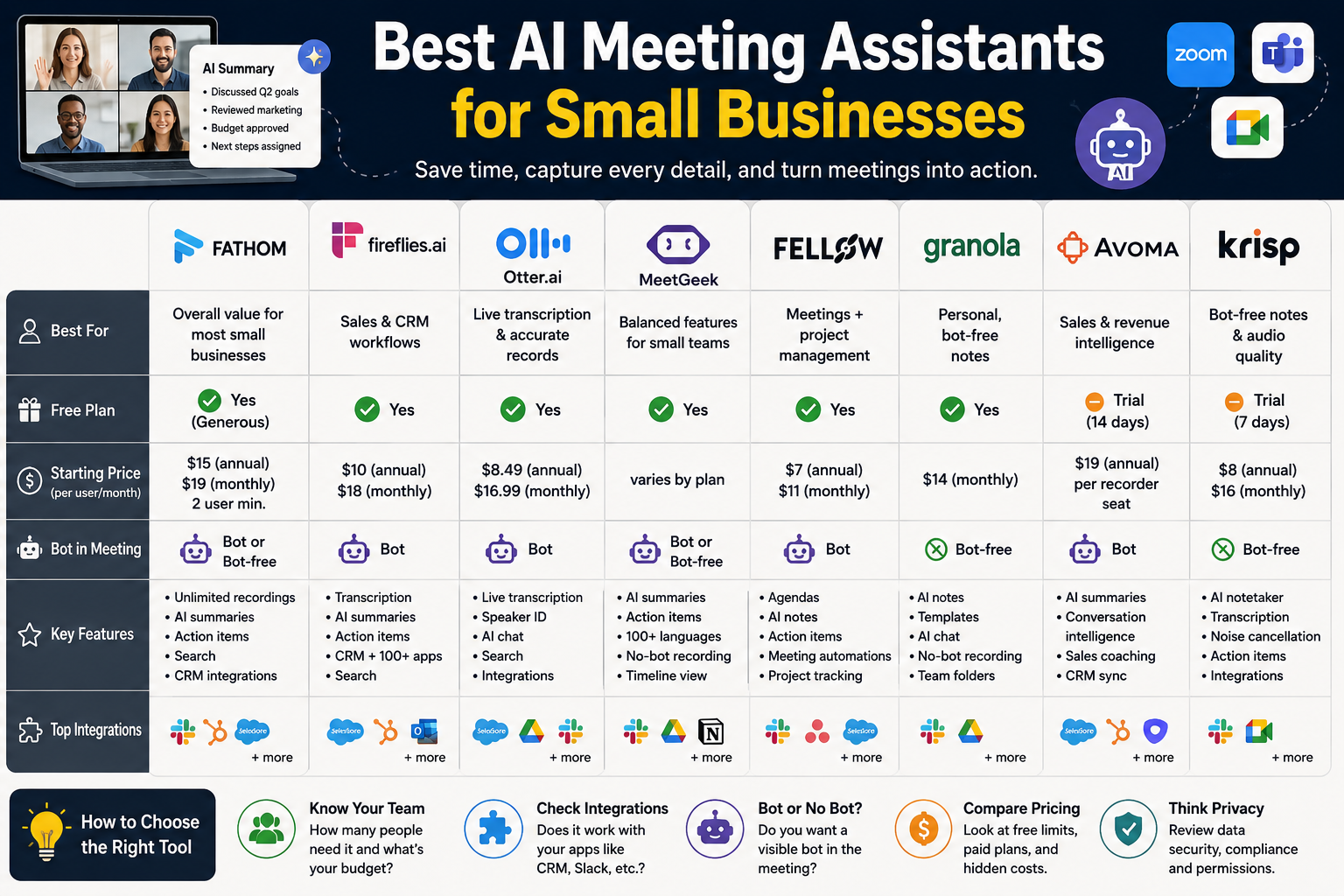
Best AI Meeting Assistants for Small Businesses at a Glance
| AI Meeting Assistant | Best For | Free Option | Paid Starting Point* |
|---|---|---|---|
| Fathom | Best overall value | Yes | $15/user/month annually for Team |
| Fireflies.ai | Sales and CRM workflows | Yes | $10/user/month annually |
| Otter.ai | Live transcription | Yes | $8.49/user/month annually |
| MeetGeek | Balanced meeting management | Yes | Varies by plan |
| Fellow | Meeting + project management | Yes | $7/user/month annually |
| Granola | Personal/bot-free notes | Yes | $14/user/month |
| Avoma | Sales and revenue teams | Trial | $19/recorder/month annually |
| Krisp | Bot-free notes and audio quality | Trial | $8/user/month annually |
*Prices can change, so verify the current price and plan limits before purchasing.
1. Fathom — Best Overall AI Meeting Assistant for Small Businesses
Best for: Small businesses that want excellent value and simple AI meeting notes.
Fathom is our top overall choice because it combines a generous free plan with the features most small businesses actually need.
Its free plan currently includes unlimited recordings and transcriptions, instant AI summaries, clips and search. Fathom also supports bot and bot-free capture options.
For teams, Fathom’s Team plan is currently $15 per user per month when billed annually or $19 monthly, with a two-user minimum. It adds features such as shared meeting notes, AI-generated action items, team search and collaboration.
Fathom works with Zoom, Google Meet and Microsoft Teams and can connect meeting information to tools such as Slack, Salesforce, HubSpot, Zapier and Asana.
Pros
- Excellent free plan
- Unlimited recordings and transcriptions
- AI summaries and action items
- Search across meetings
- Zoom, Google Meet and Teams support
- Bot-free capture options
- CRM and automation integrations
- Useful for sales, marketing, customer success and internal teams
Cons
- Some advanced team and CRM features require paid plans
- Team plan has a two-user minimum
- Advanced revenue intelligence is aimed more at larger or sales-focused teams
Best for
Choose Fathom if you want a meeting assistant that is easy to deploy without immediately adding another major software expense.
2. Fireflies.ai — Best for Sales Teams and CRM Workflows
Best for: Sales teams, agencies and businesses that want searchable meeting data and integrations.
Fireflies.ai focuses heavily on turning meetings into searchable business information.
Its free plan includes unlimited transcription but limits storage and AI usage. The Pro plan is currently $10 per seat per month when billed annually, while Business is $19 per seat per month annually.
Paid plans provide features such as video recording, unlimited AI summaries, task management, integrations, AI search and conversation intelligence.
This makes Fireflies particularly useful for businesses that have many customer or sales conversations and want to search old calls later.
Pros
- Strong searchable meeting archive
- CRM integrations
- AI summaries
- Action-item tracking
- Conversation intelligence
- Wide integration support
- Free plan available
Cons
- The number of features can feel overwhelming
- Some advanced capabilities require higher plans
- AI-credit limits need to be considered
Best for
Fireflies is a strong choice if your business regularly asks questions such as:
“What did this customer say about pricing?”
or
“What were the action items from our last five sales calls?”
3. Otter.ai — Best for Live Transcription
Best for: Teams that prioritize live transcription and searchable meeting records.
Otter.ai is one of the established names in AI transcription.
Its Basic plan is free and includes Zoom, Microsoft Teams and Google Meet support, live transcription, speaker identification and 300 monthly transcription minutes.
The Pro plan is listed at $16.99 per user per month on monthly billing, with discounted annual pricing. It adds longer meetings, advanced AI workflows, unlimited storage, advanced search and integrations such as Salesforce, HubSpot and Zapier.
Pros
- Strong live transcription
- Speaker identification
- Zoom, Teams and Google Meet support
- AI chat across meetings
- Established product
- Free plan
Cons
- Free transcription allowance is limited
- Advanced features require paid plans
- Some small businesses may not need its more advanced capabilities
Best for
Otter makes sense if your biggest problem is keeping accurate records of what was actually said during meetings.
4. MeetGeek — Best Balanced Option for Small Teams
Best for: Small businesses that want meeting summaries, action items and multiple recording options.
MeetGeek offers automatic meeting summaries, AI-generated next steps, topic timelines and a Copilot mode. It can also record meetings without a visible bot using its Chrome extension or desktop recorder.
It supports Zoom, Google Meet and Microsoft Teams and can transcribe meetings in more than 100 languages.
That combination makes it particularly interesting for small or distributed teams.
Pros
- AI summaries
- Automatic action items
- No-bot recording option
- 100+ transcription languages
- Speaker recognition
- Mobile apps
- Audio/video uploads
Cons
- Some plans have transcription limits
- Pricing and usage allowances need to be checked carefully
- Advanced features may require upgrading
Best for
MeetGeek is worth considering if you want something between a simple transcription tool and a full sales-intelligence platform.
5. Fellow — Best for Meeting Management
Best for: Small teams that want meeting notes connected to tasks and project workflows.
Fellow takes a slightly different approach. It isn’t just an AI transcription service; it combines AI meeting notes with agendas, action items, meeting automations and project-management functionality.
Its free plan includes AI meeting summaries, transcription and action items. The Team plan currently costs $7 per user per month annually or $11 monthly. Its Business plan is $15 annually or $23 monthly and adds unlimited AI notes and recordings plus CRM integrations.
Fellow integrates with Google Meet, Zoom and Microsoft Teams, and its higher plans connect with tools such as Salesforce and HubSpot.
Pros
- Very affordable Team plan
- Meeting agendas
- AI notes and summaries
- Action items
- Meeting automations
- Project-management integrations
- CRM integrations on higher plans
Cons
- Free AI usage is limited
- More useful when you want meeting-management features, not just transcription
- Advanced CRM capabilities require a higher tier
Best for
Fellow is a particularly good choice for a small company that wants to turn meetings into assigned tasks rather than simply storing transcripts.
6. Granola — Best for Personal and Bot-Free Meeting Notes
Best for: Individuals, founders and small teams who prefer lightweight AI note-taking.
Granola takes a different approach from traditional meeting bots.
Its Business plan is currently $14 per user per month, while the free Basic plan provides AI-enhanced notes, limited meeting history, AI chat, shared folders and customized note templates.
Granola runs on your computer or phone and uses your device’s audio to generate notes. The company recommends informing participants when you’re using it to transcribe a call.
Pros
- Simple note-taking experience
- Free plan
- Bot-free approach
- AI chat
- Custom note templates
- Team integrations on paid plans
Cons
- Free plan has limited meeting history
- Less focused on full team conversation intelligence
- Advanced integrations require a paid plan
Best for
Granola is a good fit for a founder or professional who mainly wants excellent personal meeting notes without adding another obvious bot participant.
7. Avoma — Best for Sales and Revenue Teams
Best for: Sales organizations, customer-success teams and businesses that need conversation intelligence.
Avoma is more specialized than many of the other tools on this list.
Its Startup plan currently costs $19 per recorder seat per month when billed annually and includes unlimited AI meeting assistance, real-time transcription, AI summaries, scheduling, email follow-ups and automatic saving of notes to CRM records.
Its additional Conversation Intelligence and Revenue Intelligence products add features such as call scoring, coaching, deal-risk alerts, sales methodology tracking and win-loss analysis.
Pros
- Strong sales functionality
- CRM integration
- AI summaries
- Conversation intelligence
- Sales coaching
- Revenue intelligence
- Free view-only users
Cons
- More expensive than lightweight note-taking tools
- Some advanced capabilities require add-ons
- Overkill for businesses that only need basic meeting notes
Best for
If your small business has a dedicated sales team and meetings directly affect your pipeline, Avoma can make more sense than a basic AI notetaker.
8. Krisp — Best for Bot-Free Notes and Audio Quality
Best for: Remote teams, people working in noisy environments and businesses that prefer bot-free meeting capture.
Krisp is known primarily for its AI-powered noise cancellation, but its current Meeting AI product also includes an AI notetaker.
The Core plan costs $8 per user per month when billed annually or $16 monthly. It includes bot-free AI note-taking, transcription, audio/video recording, AI summaries, action items, in-person meeting notes and integrations.
Krisp also provides a seven-day trial of its premium features rather than a permanent free plan.
Pros
- Bot-free AI notetaker
- Strong audio/noise-cancellation capabilities
- AI summaries
- Action items
- In-person meeting support
- Integrations
- Competitive annual price
Cons
- No permanent free tier
- Meeting intelligence isn’t its only focus
- Some advanced functionality requires higher plans
Best for
Consider Krisp if poor audio quality is a bigger problem for your business than advanced meeting analytics.
How to Choose the Best AI Meeting Assistant for Your Small Business
Don’t choose based solely on the number of features.
Instead, answer these questions.
1. How many people actually need a paid seat?
If only one or two people need meeting intelligence, paying for an expensive team platform may not make sense.
A generous free plan can be more valuable than a discounted enterprise plan.
2. Which meeting platforms do you use?
Check whether the assistant works with your existing workflow.
The major options on this list support combinations of Zoom, Google Meet and Microsoft Teams, but specific recording methods and features vary by product.
3. Do you need CRM integration?
If your meetings are primarily sales calls, CRM integration can save much more time than a slightly better transcript.
Consider:
- Salesforce
- HubSpot
- Pipedrive
- Zapier
- Slack
Fireflies, Fathom, Otter and Avoma are particularly interesting for businesses that want to move meeting information into other systems.
4. Do you want a meeting bot?
Some businesses don’t mind having an AI participant appear in a call.
Others don’t want clients asking:
“Who is this bot?”
Bot-free recording can therefore be an important purchasing criterion.
Fathom, Granola and Krisp all provide approaches that avoid the traditional visible meeting-bot experience, although their exact recording methods differ.
5. How much meeting history do you need?
This is an easy detail to overlook.
A free plan might sound excellent until you discover that it limits:
- Meeting history
- Storage
- AI queries
- Recording duration
- Monthly transcription
- Exports
Always check these limits before making a decision.
Best AI Meeting Assistant by Use Case
| If you need… | Consider |
|---|---|
| Best overall value | Fathom |
| Free meeting recording | Fathom / tl;dv / others depending on limits |
| Sales CRM workflows | Fireflies.ai |
| Live transcription | Otter.ai |
| Meeting + project management | Fellow |
| Personal bot-free notes | Granola |
| Revenue intelligence | Avoma |
| Noise cancellation + notes | Krisp |
| Multilingual transcription | MeetGeek |
Are AI Meeting Assistants Worth It for a Small Business?
They can be, particularly if your employees spend a significant amount of time in recurring meetings.
The value isn’t really the transcript itself.
The bigger benefit is what happens afterward.
A good AI meeting assistant can turn:
Meeting → Transcript → Summary → Decisions → Action items → Follow-up
Instead of someone spending another 15–30 minutes writing notes after every important call, much of the administrative work can be automated.
Fathom, for example, positions its platform around capturing decisions, action items and context and connecting those insights with other business tools.
For sales teams, the value can be even greater because meeting information can feed CRM records and follow-up workflows.
Are AI Meeting Assistants Safe for Business Meetings?
Treat meeting recordings and transcripts as business data.
Before enabling an AI assistant, review:
- Where recordings are stored
- Who can access them
- How long data is retained
- Whether recordings can be deleted
- Whether data can be used for AI training
- Available security certifications
- Sharing permissions
- CRM access
- Your industry’s privacy requirements
For example, Fireflies states that it provides SOC 2 Type II and GDPR compliance and offers controls such as private storage and data-retention options on appropriate plans.
Fathom states that it is SOC 2 Type II audited and offers GDPR and HIPAA compliance features, with additional governance controls on higher plans.
Most importantly, make sure participants know when a meeting is being recorded or transcribed and follow the laws and policies that apply to your business and location.
Free vs. Paid AI Meeting Assistants
For a small business, starting free is usually sensible.
Choose free when:
- You have relatively few meetings
- You are testing AI meeting notes
- One person uses the tool
- You don’t need CRM automation
- You don’t need extensive meeting history
Pay for a plan when:
- Multiple employees use the assistant
- You need unlimited or higher-volume transcription
- You need CRM synchronization
- You need team-wide search
- You need advanced action-item workflows
- You need administrative controls
- Meeting intelligence directly supports sales
Don’t pay for advanced conversation intelligence simply because it sounds impressive.
If your only requirement is:
“Please summarize my Zoom calls.”
a simple AI notetaker may be all you need.
Fathom vs. Fireflies vs. Otter: Which Should You Pick?
Choose Fathom if:
You want the easiest starting point and strong value.
Choose Fireflies if:
Your business is sales-heavy and CRM/search capabilities matter.
Choose Otter if:
Your priority is live transcription and accurate meeting records.
Choose Fellow if:
You want meeting notes to become tasks and structured workflows.
Choose Granola if:
You prefer lightweight, personal and bot-free note-taking.
Choose Avoma if:
Your sales organization needs deeper conversation and revenue intelligence.
Choose Krisp if:
Audio quality and bot-free capture are major priorities.
Final Verdict
For most small businesses, Fathom is the best AI meeting assistant to start with.
Its combination of a free plan, unlimited recordings and transcriptions, AI summaries, action items, search and integrations gives small businesses a lot of functionality without requiring an immediate software investment.
However, there isn’t one universal winner.
Fireflies.ai is arguably the better fit for sales and CRM-heavy organizations.
Otter.ai is a strong choice for transcription-first workflows.
Fellow makes more sense when meetings need to feed directly into team tasks and project management.
Granola is attractive for individuals who want simple bot-free notes.
Avoma is the better fit for businesses that need sophisticated sales intelligence.
And Krisp is compelling when audio quality and bot-free meeting capture are important.
The smartest approach for a small business is to identify your primary meeting problem first, then choose the least expensive tool that solves it well.
Frequently Asked Questions
What is the best AI meeting assistant for a small business?
Fathom is our overall pick for most small businesses because of its generous free plan, meeting summaries, transcription, action items and integrations.
What is the best free AI meeting assistant?
Fathom is one of the strongest options for businesses starting without a budget because its free plan currently includes unlimited recordings and transcriptions.
Is Fireflies.ai good for small businesses?
Yes. Fireflies is particularly useful for small sales teams that need searchable meeting archives, action items and CRM integrations.
Is Otter.ai good for business meetings?
Yes. Otter is especially useful for businesses that prioritize live transcription, speaker identification and searchable meeting records.
Which AI meeting assistant is best for sales teams?
Fireflies and Avoma are two strong choices. Fireflies emphasizes searchable meetings and integrations, while Avoma is more heavily focused on sales and revenue intelligence.
Can AI meeting assistants work without a bot?
Yes. Several products now offer bot-free recording or note-taking options, including Fathom, Granola and Krisp. The exact capture method varies by platform.
Should a small business pay for an AI meeting assistant?
If your team spends significant time taking notes, updating CRMs and preparing follow-ups, a paid plan can be worthwhile. Start with a free or low-cost plan and upgrade only when you encounter a real limitation.