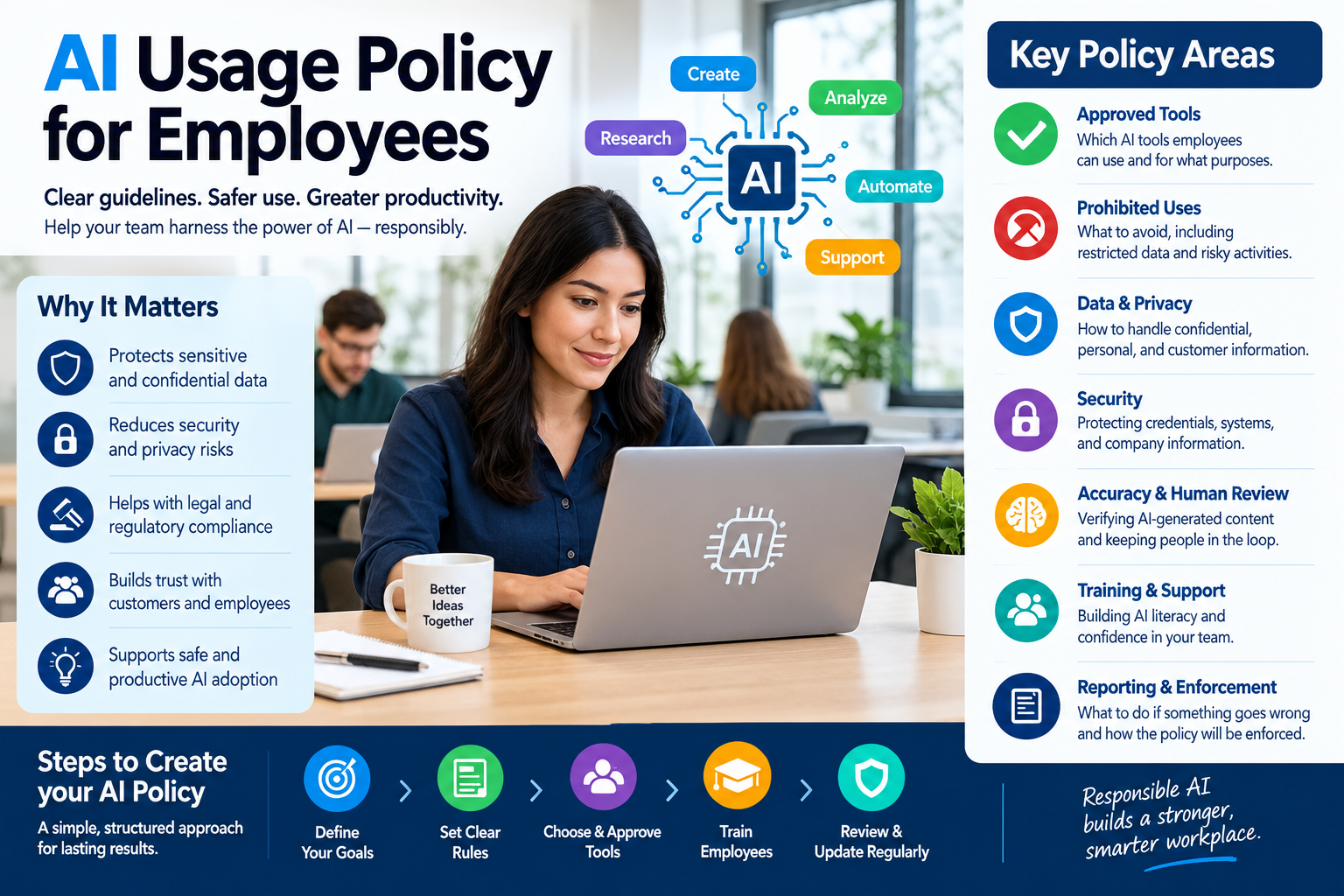
How to Create an AI Usage Policy for Employees: A Practical Guide
Artificial intelligence is quickly becoming part of everyday business work. Employees may use AI tools to brainstorm ideas, summarize documents, write emails, analyze information, create presentations, generate code, research topics, or automate repetitive tasks.
That creates an important challenge for businesses: How do you allow employees to benefit from AI without exposing the company to unnecessary security, privacy, legal, or operational risks?
The answer is an AI usage policy for employees.
A good AI policy should not simply say, “Don’t use AI.” It should explain which AI tools employees may use, what information they can enter, which activities require human review, what uses are prohibited, and what employees should do when they are unsure.
The goal is to create a practical framework that supports useful AI adoption while establishing reasonable safeguards.
This guide explains how to create an employee AI usage policy, what sections to include, common mistakes to avoid, and how to turn the policy into something employees can actually follow.
What Is an AI Usage Policy for Employees?
An AI usage policy is a company document that establishes rules and guidelines for how employees may use artificial intelligence during work.
It can cover technologies such as:
- Generative AI chatbots
- AI writing assistants
- AI image generators
- AI coding assistants
- AI meeting transcription tools
- AI research tools
- AI productivity assistants
- AI-powered customer service tools
- AI analytics platforms
- AI recruitment or HR software
- AI automation systems
The policy should explain both acceptable and unacceptable uses.
For example, an organization might allow an employee to use an approved AI assistant to brainstorm marketing ideas but prohibit the employee from entering confidential customer information into an unapproved public AI service.
The exact rules should depend on the company’s industry, data, customers, technology environment, and legal obligations.
Why Does a Company Need an AI Usage Policy?
Employees may already be using AI even if the company has not formally approved it.
An employee might sign up for an AI service using a personal account, paste work information into it, or install an AI browser extension without realizing the potential consequences.
Without clear guidance, employees may have to make their own decisions about:
- Which AI tools are acceptable
- What information can be entered
- Whether AI-generated information can be trusted
- Whether AI-generated content needs disclosure
- Who is responsible for reviewing AI output
- Whether an AI tool can be used for customer information
- Whether AI can be used for employment decisions
- When manager or IT approval is required
A written policy gives employees a consistent framework.
It also gives the organization a foundation for training, risk management, tool approval, incident reporting, and periodic policy updates.
NIST’s AI Risk Management Framework is designed as a voluntary resource for organizations managing AI risks, with a structure built around governing, mapping, measuring, and managing those risks. Its Generative AI Profile provides additional considerations for generative AI systems.
What Should an Employee AI Policy Cover?
A useful AI usage policy should answer a few basic questions:
- What AI tools can employees use?
- What can employees use them for?
- What information can they enter?
- What information must never be entered?
- What requires human review?
- Which AI activities are prohibited?
- When is manager, legal, security, or IT approval required?
- How should employees report mistakes or incidents?
- What training must employees complete?
- How often will the policy be reviewed?
If employees cannot easily answer these questions, the policy probably needs to be simplified.
Step 1: Define the Purpose of the Policy
Start your policy by explaining why the company has created it.
Avoid making the introduction sound like AI is inherently dangerous.
Instead, explain that the organization wants employees to use AI responsibly and productively while protecting company information, customers, employees, and business operations.
For example, your policy could establish goals such as:
- Encourage responsible AI adoption.
- Improve employee productivity.
- Protect confidential information.
- Protect personal and customer data.
- Reduce cybersecurity risks.
- Maintain human oversight.
- Protect intellectual property.
- Improve the accuracy of business decisions.
- Establish accountability for AI-assisted work.
A clear purpose makes the policy easier for employees to understand.
Step 2: Define What Counts as AI
Employees may have very different ideas about what qualifies as an AI tool.
Your policy should therefore define the term broadly enough to cover the technologies your organization actually uses.
For example, AI may include:
- Chatbots
- Generative AI systems
- AI writing tools
- AI coding tools
- AI-powered search
- Machine-learning applications
- Automated decision systems
- AI meeting assistants
- AI image and video generators
- AI transcription services
- AI-powered analytics
- AI recruitment systems
You can also explain that the policy applies whether an AI feature is a standalone application or built into another business application.
This prevents employees from assuming that an AI feature is exempt simply because it is integrated into software the company already uses.
Step 3: Create an Approved AI Tool List
One of the most practical sections of an employee AI policy is an approved tools list.
Instead of telling employees to avoid AI entirely, identify the tools they are allowed to use.
For example:
| AI Tool Category | Example Policy |
|---|---|
| Company-approved chatbot | Allowed for approved business tasks |
| AI writing assistant | Allowed for drafting and editing |
| AI coding assistant | Allowed for approved development work |
| AI meeting transcription | Allowed with appropriate authorization |
| Public AI chatbot | Restricted |
| Personal AI account | Not permitted for confidential company information |
| Unapproved browser extension | Requires IT approval |
| AI recruitment software | Requires HR/legal review |
The actual tools should be determined by your organization’s security, privacy, procurement, and legal requirements.
Step 4: Establish an AI Approval Process
Your policy should explain how employees can request permission to use a new AI tool.
A simple approval process might require the employee to provide:
- Tool name
- Vendor
- Intended business purpose
- Types of information the tool will process
- Whether customer or employee data is involved
- Whether the tool connects to company systems
- Whether the tool stores prompts or uploaded information
- Whether the tool generates automated decisions
- Estimated number of users
The request can then be reviewed by the appropriate people.
Depending on the organization, this could include:
- IT
- Information security
- Privacy
- Legal
- Compliance
- Procurement
- HR
- Department management
Small businesses may combine several of these responsibilities rather than creating a large approval committee.
Step 5: Create Clear Rules for Confidential Information
This is one of the most important sections of an employee AI policy.
Employees should understand that they cannot automatically paste company information into an AI tool just because the tool is convenient.
The policy should identify categories of information that require special protection.
These may include:
- Customer personal information
- Employee personal information
- Passwords
- Authentication credentials
- Financial information
- Bank details
- Private contracts
- Trade secrets
- Source code
- Security information
- Unreleased products
- Confidential business plans
- Private legal documents
- Proprietary research
- Sensitive customer communications
Instead of simply saying “Don’t enter confidential information,” provide examples.
For example:
Do not paste confidential customer records, passwords, private contracts, proprietary source code, or other restricted information into an AI service unless the organization has specifically approved that tool and use case.
Clear examples are easier for employees to understand than vague warnings.
Step 6: Explain Personal Data Rules
AI systems may process personal information, so the policy should address privacy.
Employees should know:
- What personal data they may process using approved AI tools.
- Which categories require authorization.
- Which AI tools are approved for personal data.
- Whether personal data must be anonymized or minimized.
- Who to contact with privacy questions.
- How to report accidental disclosure.
The organization should also align the policy with applicable privacy and data-protection requirements.
For example, the UK’s Information Commissioner’s Office emphasizes that organizations using AI need to consider data-protection risks and safeguards, including the purpose for processing personal information. Its guidance distinguishes legal requirements from recommended good practice and advocates a proportionate, risk-based approach.
For businesses operating in other jurisdictions, the applicable privacy requirements may differ.
Step 7: Set Rules for AI-Generated Content
AI-generated content should not automatically be treated as accurate simply because it looks professional.
Employees should be required to review AI-generated material before using it for important business purposes.
Depending on the task, employees may need to verify:
- Facts
- Numbers
- Names
- Dates
- Citations
- Legal statements
- Financial information
- Technical information
- Customer information
- Company policies
- Product specifications
This is particularly important because generative AI can produce plausible-looking information that is incorrect.
Your policy should clearly establish that human employees remain responsible for reviewing AI-assisted work.
Step 8: Create a Human Review Requirement
A strong employee AI policy should identify situations where human review is mandatory.
Examples might include:
Customer communications
AI-generated customer messages should be reviewed before being sent when errors could materially affect the customer.
Legal documents
AI should not independently create or approve legal advice or legally binding documents without appropriate human review.
Financial decisions
AI-generated financial analysis should be checked by an appropriately qualified employee.
Security decisions
AI output should not automatically determine whether a security incident is genuine or how it should be handled.
HR decisions
AI should not independently determine hiring, firing, promotion, compensation, or disciplinary outcomes without appropriate human oversight and compliance review.
The level of review should depend on the potential consequences of an error.
Step 9: Address AI Use in Hiring and HR
AI used in employment decisions deserves special attention.
Potential applications include:
- Resume screening
- Candidate ranking
- Interview analysis
- Performance evaluation
- Promotion recommendations
- Employee monitoring
- Scheduling
- Workforce analytics
These applications can raise discrimination, privacy, transparency, accessibility, and employment-law concerns.
For example, the U.S. Equal Employment Opportunity Commission explains that existing federal employment discrimination laws can apply when employers use AI or other automated technologies. It also identifies AI applications in recruiting, hiring, promotion, workplace monitoring, pay decisions, and termination as areas where discrimination concerns can arise.
Therefore, an employee AI policy should not allow employees to independently introduce AI into employment decision-making.
Instead, require appropriate review by HR, legal, compliance, or another designated function.
Step 10: Protect Intellectual Property
AI usage can create intellectual-property questions.
Employees should understand the company’s expectations concerning:
- Copyrighted material
- Company-owned content
- Customer content
- Licensed materials
- Source code
- Product designs
- Images
- Marketing content
- Training materials
- Confidential inventions
Your policy should discourage employees from uploading third-party copyrighted or licensed material into AI tools unless the organization has determined that the use is permitted.
It should also establish ownership and review procedures for AI-assisted work.
Because intellectual-property laws differ by jurisdiction and circumstances, the policy should be reviewed by appropriate legal counsel when necessary.
Step 11: Create Cybersecurity Rules
AI tools can introduce cybersecurity risks.
Employees should never use AI as a reason to bypass normal security controls.
Your policy should address:
- Passwords
- API keys
- Security credentials
- Private keys
- Internal network information
- Vulnerability information
- Security incident details
- Malware samples
- Sensitive system configurations
- Authentication tokens
For example:
Employees must not enter passwords, API keys, authentication tokens, private encryption keys, or other security credentials into public AI tools.
Also prohibit employees from installing unapproved AI software or browser extensions on company devices.
Step 12: Explain When Employees Can Use AI
A policy becomes much more useful when it includes allowed examples.
For instance, employees may be allowed to use approved AI tools to:
- Brainstorm ideas
- Create first drafts
- Rewrite text
- Summarize non-sensitive documents
- Generate meeting agendas
- Create outlines
- Explain technical concepts
- Generate non-sensitive code
- Create marketing concepts
- Organize information
- Create internal productivity workflows
The organization can then establish additional restrictions for higher-risk activities.
This approach is usually clearer than simply saying “AI is allowed” or “AI is prohibited.”
Step 13: Define Prohibited AI Uses
Your policy should include a clear list of prohibited activities.
Depending on the organization, these may include:
- Entering passwords into public AI tools
- Uploading confidential information to unapproved services
- Uploading sensitive customer data without authorization
- Using AI to bypass security controls
- Using unapproved AI applications on company systems
- Presenting AI-generated information as verified fact without review
- Allowing AI to make unauthorized employment decisions
- Using AI to impersonate customers or employees
- Generating fraudulent documents
- Circumventing company policies with AI
- Using AI to perform illegal activities
- Publishing AI-generated content without required review
The prohibited-use list should be specific enough that employees can understand what behavior is not permitted.
Step 14: Create Different Rules for Different Risk Levels
Not every AI use has the same level of risk.
For example:
Low risk:
Brainstorming ideas for an internal presentation.
Moderate risk:
Creating a customer-facing marketing draft.
Higher risk:
Analyzing personal customer information.
High risk:
Using AI to make or recommend employment decisions.
A useful policy can categorize AI activities according to risk.
For example:
| Risk Level | Example | Typical Control |
|---|---|---|
| Low | Brainstorming | Approved tools |
| Medium | Customer-facing drafts | Human review |
| High | Personal or confidential data | Specific approval |
| Very high | Employment or sensitive decisions | Specialized review and controls |
This risk-based approach is more practical than treating every AI use identically.
NIST’s AI Risk Management Framework and Generative AI Profile support a risk-management approach that can be adapted to an organization’s needs rather than treating every AI application as having identical risks.
Step 15: Create an AI Training Program
A policy alone isn’t enough.
Employees need to understand how to apply it.
Training should cover topics such as:
- What AI is
- Which AI tools the company approves
- What information must remain confidential
- Privacy requirements
- Cybersecurity risks
- AI-generated inaccuracies
- Human review
- Intellectual property
- Reporting procedures
- Appropriate prompting
- Approved business use cases
Training should be tailored to employees’ roles.
For example, a software developer may need different AI training from an HR employee or accountant.
The European Commission’s current AI literacy guidance specifically emphasizes considering employees’ technical knowledge, experience, education, training, the AI systems involved, and the context in which they are used. For organizations subject to the EU AI Act, Article 4 AI-literacy requirements are therefore an important consideration.
Step 16: Create an AI Incident Reporting Process
Employees need to know what to do when something goes wrong.
Examples include:
- Confidential information accidentally entered into an AI tool
- AI generated incorrect customer information
- An AI tool exposed unexpected information
- An employee installed an unapproved AI application
- AI generated discriminatory or inappropriate content
- AI output caused a business error
- An AI tool behaved unexpectedly
- A customer received incorrect AI-generated information
The policy should provide a simple reporting method.
For example:
If you believe company information has been entered into an unauthorized AI service, report the incident immediately to the IT/security team using the company’s established incident-reporting process.
Don’t make employees investigate the incident themselves before reporting it.
Step 17: Explain Employee Accountability
An AI policy should make clear that using AI does not remove an employee’s responsibility for their work.
For example:
Employees remain responsible for reviewing AI-assisted work and complying with applicable company policies, security requirements, privacy requirements, and professional responsibilities.
This is especially important when AI is used for:
- Customer communication
- Financial work
- Legal work
- HR
- Software development
- Research
- Safety-related activities
- Business decisions
AI can assist employees, but responsibility should remain clearly assigned.
Step 18: Decide Whether Employees Must Disclose AI Use
Some organizations may want employees to disclose when AI significantly contributes to certain types of work.
Disclosure requirements could apply to:
- Public-facing content
- Customer communications
- Research
- Legal documents
- Regulatory submissions
- Academic or professional materials
- Creative work
- AI-generated images
- AI-generated videos
The policy should define when disclosure is required rather than requiring employees to disclose every minor use of an AI writing assistant.
For example, correcting a spelling mistake with an AI-powered writing feature may not need the same disclosure as publishing an entirely AI-generated report.
Step 19: Establish a Vendor Review Process
Don’t evaluate an AI tool only by asking whether it produces good answers.
Before approving an AI vendor, consider questions such as:
- What information does the service collect?
- How is customer data handled?
- Is company information used to train models?
- Where is data stored?
- How long is information retained?
- Can administrators control user access?
- Does the service support business accounts?
- What security controls are available?
- Can the organization delete data?
- Does the vendor provide appropriate contractual protections?
- Can the organization audit usage?
- What happens when the contract ends?
For sensitive use cases, the procurement and security review may need to be substantially more detailed.
Step 20: Include a Simple AI Decision Checklist
Employees don’t always need to read the entire policy before every AI interaction.
Give them a short decision checklist.
Before using an AI tool, ask:
1. Is this tool approved?
If not, check the approval process.
2. What information am I entering?
If it includes confidential, personal, financial, customer, or security information, stop and verify whether the use is authorized.
3. Is this task high risk?
If the answer is yes, additional review may be required.
4. Could an AI mistake cause harm?
If yes, make sure an appropriate human reviews the result.
5. Am I allowed to use the output?
Consider privacy, intellectual property, company policies, and contractual obligations.
6. Do I need to disclose AI involvement?
Follow the company’s disclosure rules.
This checklist can be placed on the company’s intranet or included in employee onboarding materials.
Sample AI Usage Policy for Employees
The following is a starting framework that businesses can customize.
Purpose
Our organization supports the responsible use of artificial intelligence to improve productivity, creativity, research, and business processes while protecting company information, customers, employees, and business operations.
Approved Use
Employees may use company-approved AI tools for legitimate business purposes consistent with their role and applicable company policies.
Examples include brainstorming, drafting, summarization, research assistance, content development, coding assistance, and other approved productivity tasks.
Confidential Information
Employees must not enter confidential, proprietary, personal, customer, financial, security, or other restricted information into AI tools unless the specific tool and use case have been approved for that type of information.
Accuracy and Human Review
Employees must review AI-generated information before relying on it for business purposes. AI-generated content must not automatically be treated as accurate, complete, or authoritative.
Security
Employees must not enter passwords, authentication credentials, API keys, private keys, or other sensitive security information into AI tools.
Employees must not install unapproved AI software, browser extensions, or applications on company devices.
Privacy
Employees must follow applicable privacy requirements and company data-handling procedures when using AI systems.
Employment Decisions
Employees must not independently use AI to make or automate employment decisions involving hiring, promotion, compensation, discipline, termination, or other sensitive employment matters unless specifically authorized and subject to appropriate review.
Intellectual Property
Employees must follow company rules and applicable laws concerning copyrighted, licensed, proprietary, and third-party materials when using AI tools.
Reporting
Employees must promptly report suspected unauthorized disclosure, security incidents, privacy incidents, significant AI errors, or other policy violations through the company’s established reporting process.
Accountability
Employees remain responsible for their work even when AI tools are used to assist with that work.
Training
Employees who use AI as part of their work may be required to complete AI usage, security, privacy, or other relevant training.
Policy Updates
The organization may update this policy as AI technologies, business requirements, security risks, and applicable laws change.
How to Make an AI Policy Employees Will Actually Follow
A policy can be technically comprehensive and still fail if employees find it confusing.
Use plain language.
Instead of:
“Employees shall refrain from submitting proprietary information to externally hosted generative computational systems.”
Say:
“Do not paste confidential company information into public AI tools.”
The second version is much easier to understand.
Use examples
Don’t simply say “confidential information.”
Explain what that means.
Make rules visible
Put the most important rules into:
- Employee handbooks
- Intranet pages
- Onboarding materials
- Security training
- AI training
- Quick-reference guides
Keep the policy updated
AI tools and features change rapidly.
A policy written once and never reviewed can quickly become outdated.
Common Mistakes When Creating an Employee AI Policy
Mistake 1: Banning AI Completely
A blanket ban may be difficult to enforce if employees already use AI tools for everyday work.
Instead, consider defining acceptable uses and restricted uses.
Mistake 2: Making the Policy Too Vague
“Use AI responsibly” isn’t enough.
Employees need specific examples.
Mistake 3: Allowing Every AI Tool
Employees shouldn’t automatically be allowed to use any tool they discover online.
Create an approval process.
Mistake 4: Ignoring Personal Data
Privacy should be addressed explicitly.
Employees need to know what data can and cannot be processed by AI.
Mistake 5: Forgetting AI Accuracy
AI-generated information can require fact-checking.
The policy should make human review part of the workflow.
Mistake 6: Ignoring HR Applications
AI used for hiring, performance evaluation, monitoring, promotion, or other employment decisions can introduce significant legal and fairness concerns.
These applications deserve specialized review.
Mistake 7: Creating a Policy Without Training
Employees cannot follow rules they don’t understand.
Training should accompany the policy.
Mistake 8: Never Updating the Policy
AI technology changes quickly.
Review the policy periodically and whenever there is a significant change to:
- AI tools
- Company systems
- Data practices
- Security risks
- Business operations
- Applicable laws or regulations
How Often Should an AI Policy Be Reviewed?
There is no universal review interval that works for every organization.
A practical approach is to conduct a formal review at least annually and also review the policy when major changes occur.
Consider an additional review when:
- The company adopts a major AI platform.
- A new AI feature is introduced into existing software.
- A security incident occurs.
- A privacy incident occurs.
- AI becomes part of a new business process.
- The organization enters a new market.
- Relevant regulations change.
- Employees identify a new AI risk.
AI governance should be treated as an ongoing process rather than a one-time document.
AI Policy Checklist for Small Businesses
Small businesses don’t necessarily need a 50-page AI policy.
A concise policy can cover the essentials.
Make sure it answers:
- Which AI tools are approved?
- Which AI tools require approval?
- What information cannot be entered?
- What personal data restrictions apply?
- What security information is prohibited?
- What AI uses are prohibited?
- Which tasks require human review?
- What rules apply to customer-facing content?
- What rules apply to HR decisions?
- How should AI incidents be reported?
- What training is required?
- Who owns the policy?
- When will the policy be reviewed?
If you can answer these questions clearly, you have the foundation of a useful employee AI policy.
Final Thoughts
Creating an AI usage policy for employees doesn’t have to mean creating a complicated legal document.
The most effective policy is one employees can understand and apply during their everyday work.
Start by identifying the AI tools your organization uses. Then classify the major risks, establish approved and prohibited uses, protect confidential and personal information, require appropriate human review, create an approval process, train employees, and establish a simple incident-reporting procedure.
Most importantly, treat the policy as a living document.
AI capabilities, workplace practices, security risks, and applicable legal requirements continue to evolve. A policy that is reviewed and updated regularly is more useful than one that is written once and forgotten.
The goal isn’t simply to restrict AI.
The goal is to give employees a clear framework for using AI productively, securely, responsibly, and consistently.
Frequently Asked Questions
What is an AI usage policy for employees?
An AI usage policy explains how employees may use artificial intelligence for work. It typically covers approved tools, prohibited uses, data protection, security, accuracy, human review, intellectual property, training, and incident reporting.
Should a company allow employees to use ChatGPT or other AI tools?
A company can decide which AI tools employees may use based on its business requirements, security controls, privacy obligations, and risk tolerance. Instead of automatically allowing every tool, organizations can establish an approved-tool process.
What should employees never put into AI tools?
Common examples include passwords, API keys, authentication credentials, confidential company information, sensitive customer information, restricted employee information, proprietary source code, and other information that the organization’s policy prohibits from being shared with unapproved services.
Should employees be allowed to use AI for customer data?
Only when the organization has determined that the specific AI tool and use case are appropriate for that type of data and comply with applicable privacy, contractual, security, and internal requirements.
Should AI-generated work always be checked by a human?
For many business tasks, human review is an important safeguard. The level of review should increase when an incorrect AI output could have significant financial, legal, security, employment, customer, or safety consequences.
Should AI use be disclosed to customers?
That depends on the use case, organization, contractual requirements, applicable law, and company policy. A policy should identify situations where disclosure is required rather than treating every minor AI-assisted edit identically.
How should a small business create an AI policy?
Start with a short policy covering approved tools, prohibited data, acceptable uses, human review, security, privacy, incident reporting, training, and policy ownership. Expand the policy as the company’s AI use becomes more complex.
Who should be responsible for an employee AI policy?
Responsibility can be shared among leadership, IT/security, HR, legal/privacy, compliance, and relevant business teams. Smaller organizations may assign ownership to one person while consulting specialists when necessary.
Does an AI policy need to be reviewed by a lawyer?
For organizations dealing with sensitive personal data, regulated industries, employment decisions, intellectual property, customer contracts, or other significant legal risks, legal review can be appropriate. The applicable requirements vary by jurisdiction and business activity.
Is AI training necessary for employees?
Training helps employees understand the organization’s approved tools, data restrictions, security requirements, AI limitations, and reporting procedures. For organizations subject to the EU AI Act, AI-literacy requirements are an additional consideration.