Shadow AI: What It Is and How Small Businesses Can Control It
Artificial intelligence is quickly becoming part of everyday business work. Employees use AI to write emails, summarize documents, analyze spreadsheets, create marketing content, research customers, generate code, and automate repetitive tasks.
That productivity can be valuable—but it creates a new problem when employees start using AI tools that the business hasn’t approved, reviewed, or secured.
This practice is commonly called Shadow AI.
Shadow AI doesn’t necessarily mean an employee is doing something malicious. In many cases, an employee is simply trying to get their work done faster and discovers that an AI tool can solve a problem their existing software doesn’t handle well.
The problem is that the business may not know what tools are being used, what information employees are entering, what accounts are connected, or where company data is being processed.
For a small business without a large IT or security department, that can create significant privacy, cybersecurity, compliance, intellectual-property, and operational risks.
The solution isn’t necessarily to ban AI.
Instead, small businesses should create a simple system that makes approved AI use easy, unauthorized high-risk use difficult, and responsible AI use understandable.
What Is Shadow AI?
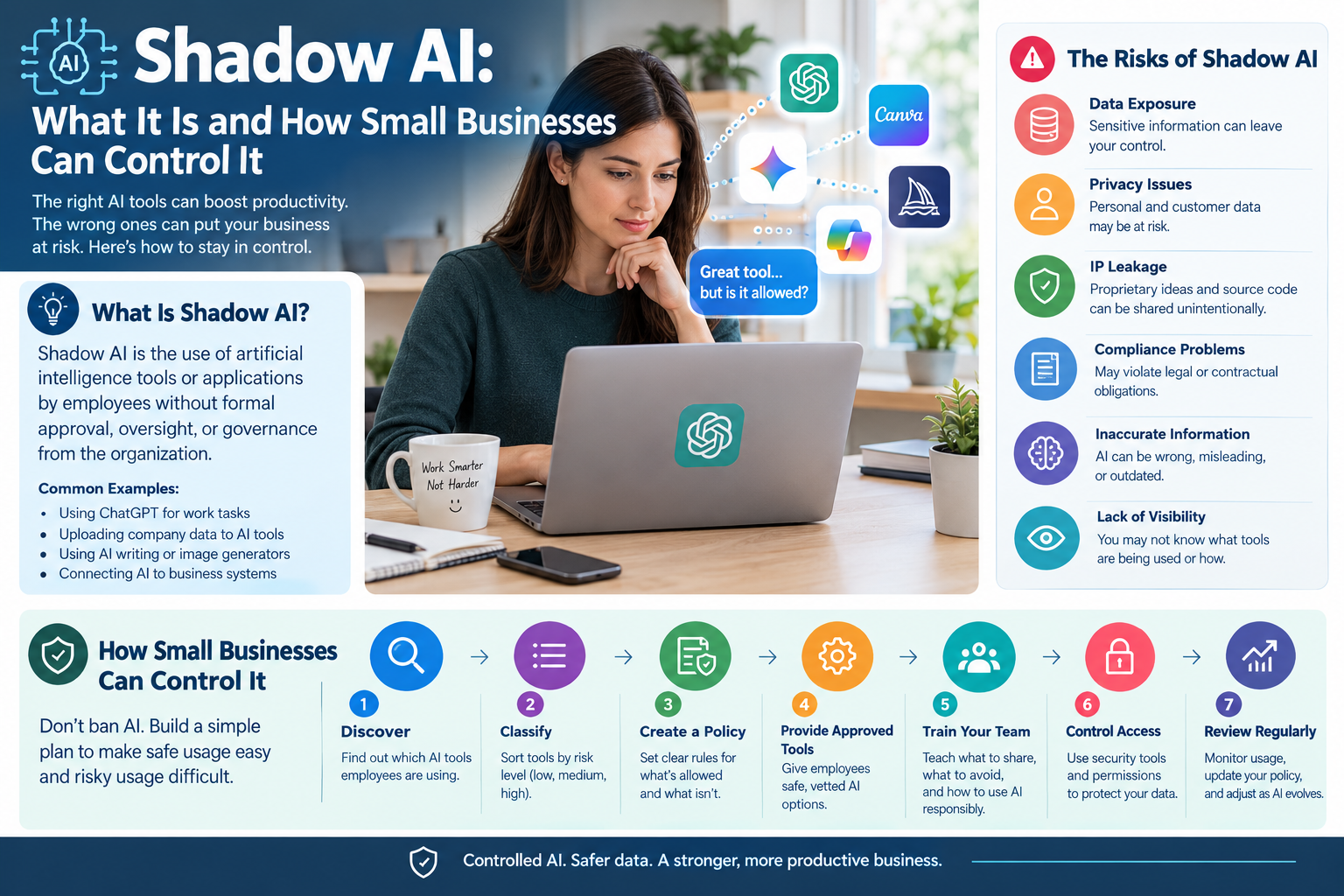
Shadow AI is the use of artificial-intelligence tools or applications by employees without formal approval, oversight, or governance from the organization.
For example, imagine an employee receives a 20-page customer complaint and wants to summarize it quickly.
They paste the document into a public AI chatbot because it’s faster than doing the work manually.
If the company hasn’t approved that AI service, the employee has potentially created a Shadow AI situation.
Other examples include:
- Using an AI writing assistant without company approval
- Uploading customer documents to an AI chatbot
- Using an AI image generator for company marketing
- Connecting an AI service to company email
- Using an AI browser extension
- Asking AI to analyze internal spreadsheets
- Using personal AI accounts for company work
- Connecting an AI application to a CRM
- Using AI-generated code in company software without review
- Creating an AI-powered automation without IT or management approval
The important distinction is authorization and oversight, not whether the employee’s intention was good or bad.
Shadow AI vs. Shadow IT
Shadow AI is closely related to Shadow IT, but the two aren’t identical.
Shadow IT
Shadow IT generally refers to employees using hardware, software, cloud services, applications, or other technology without the organization’s knowledge or approval.
Shadow AI
Shadow AI is the AI-specific version of that problem.
It includes unauthorized use of:
- Generative AI chatbots
- AI writing tools
- AI coding assistants
- AI meeting transcription tools
- AI image generators
- AI research tools
- AI browser extensions
- AI automation platforms
- AI agents
- AI-powered productivity applications
Shadow AI deserves special attention because employees may send business information directly into an external AI system as part of normal interaction with the tool.
Why Are Employees Using Shadow AI?
Understanding why employees use unauthorized AI is one of the most important parts of controlling it.
If management simply blocks every AI website, employees may find another way to accomplish the same task.
Common reasons include:
1. Employees want to save time
AI can quickly perform tasks that would otherwise take considerable time.
2. Approved software doesn’t meet their needs
An employee may already have company-approved tools but discover that another AI application works better for a particular task.
3. AI tools are easy to access
Employees can often create an account and begin using an AI service within minutes.
4. Employees don’t know the rules
A company may have cybersecurity policies but never clearly explain whether employees can use AI.
5. Employees don’t realize the risk
Someone may think:
“I’m only asking AI to summarize this document.”
They may not realize that the document itself could contain confidential information.
6. Employees are experimenting
AI is developing rapidly, and workers naturally want to experiment with new tools.
7. Management has not provided alternatives
If employees aren’t given approved AI tools, some will find their own.
This is why an effective Shadow AI strategy should address the business need behind unauthorized AI use, rather than treating employees as the problem.
How Common Is Shadow AI?
The broader workplace trend makes Shadow AI increasingly relevant.
Microsoft’s 2024 Work Trend Index reported that 78% of AI users were bringing their own AI tools to work, with the figure reaching 80% among small and medium-sized companies in its survey. The report also found that many workers were reluctant to admit using AI for important work. Microsoft
IBM likewise describes Shadow AI as unauthorized employee use of AI applications and highlights risks including data leakage, compliance problems, and loss of control over sensitive information. IBM
The broader takeaway for small businesses isn’t that every employee is secretly misusing AI.
It’s that AI adoption can move faster than an organization’s ability to create policies and controls around it.
Microsoft’s 2026 Work Trend Index similarly found that organizational readiness is lagging behind how employees are using AI, with only 26% of surveyed AI users saying leadership was clearly and consistently aligned on AI. Microsoft
Why Is Shadow AI a Problem for Small Businesses?
Shadow AI creates several categories of risk.
1. Sensitive Data Exposure
This is often the biggest concern.
An employee might paste:
- Customer information
- Employee records
- Contracts
- Financial information
- Business plans
- Internal emails
- Source code
- Pricing information
- Sales data
- Passwords or credentials
- Legal documents
into an AI service without understanding how that information is processed.
The company may then lose visibility into where that information goes and who can access it.
The FTC recommends that businesses know what sensitive information they possess, protect it appropriately, limit access based on legitimate business needs, and train employees on security practices. Federal Trade Commission
2. Privacy Risks
AI applications can process large amounts of information.
If employees submit personal information without authorization, the company could create privacy problems involving:
- Customer data
- Employee information
- Applicant information
- Health-related information
- Financial information
- Contact details
- Private communications
The specific legal requirements depend on the business, location, industry, customers, and type of data involved.
Therefore, a simple company rule such as “Never put confidential or personal information into an unapproved AI tool” can be an important baseline.
3. Intellectual Property Risks
Employees may unintentionally expose valuable intellectual property through AI tools.
Examples include:
- Proprietary product designs
- Software source code
- Business strategies
- Marketing plans
- Trade secrets
- Internal research
- Unreleased product information
- Customer databases
Even if no immediate breach occurs, sending proprietary information to an external service can create questions about ownership, confidentiality, retention, and contractual obligations.
4. Compliance Risks
Some businesses operate under specific legal or contractual requirements regarding customer and employee data.
For example, organizations may have obligations involving:
- Financial information
- Healthcare information
- Children’s information
- Employee records
- Customer privacy
- Payment information
- Contractual confidentiality
AI doesn’t automatically eliminate those responsibilities.
If an employee sends regulated or confidential information into an unauthorized AI system, the business may still be responsible for how that information was handled.
5. Incorrect AI-Generated Information
Shadow AI isn’t only a security issue.
AI can produce inaccurate, incomplete, outdated, or misleading information.
An employee might use AI to:
- Draft a legal response
- Calculate financial information
- Explain a technical problem
- Write customer advice
- Create product specifications
- Summarize a contract
- Generate medical-related information
If nobody reviews the output, an AI mistake can become a business mistake.
For higher-risk work, businesses should require human review before AI-generated output is used externally or relied upon for important decisions.
6. Lack of Accountability
Suppose an employee uses a personal AI account to create a customer proposal.
Later, the customer asks:
- Which AI system generated it?
- What information was provided?
- Who reviewed the output?
- Was customer data uploaded?
- Which account owns the generated material?
- What happens if the employee leaves?
If the organization doesn’t know that the AI tool was being used, answering those questions becomes much harder.
7. Third-Party Risk
An AI application is still a third-party technology service.
Connecting an AI tool to:
- Cloud storage
- CRM systems
- Accounting platforms
- Customer databases
- Code repositories
can increase the potential impact of a compromised or poorly governed application.
NIST’s generative-AI profile specifically highlights third-party considerations and notes potential intellectual-property, privacy, and information-security risks associated with third-party AI systems. NIST SI Resource Center
Signs Your Small Business May Have Shadow AI
You don’t need sophisticated security software to recognize warning signs.
Look for:
Employees using personal AI accounts
If employees use personal AI accounts for company work, the organization may have limited visibility and control.
Unknown AI browser extensions
Employees may install AI-powered extensions without realizing what access they receive.
Unexpected AI-related expenses
A company card may show subscriptions nobody formally requested.
AI-generated work appearing suddenly
A dramatic increase in AI-generated marketing, code, reports, or documentation can indicate informal AI adoption.
Employees asking whether AI is allowed
This is actually a useful signal.
It may indicate that the business has not communicated a clear policy.
Multiple employees using different AI tools for the same task
This can indicate that the company lacks a standardized AI workflow.
Employees saying, “I just use ChatGPT for…”
Treat this as an opportunity to understand the workflow—not automatically as misconduct.
How Small Businesses Can Control Shadow AI
A practical Shadow AI program can be built around seven steps.
Step 1: Create an AI Inventory
Start by finding out what AI tools employees are already using.
Ask:
- Which AI tools do you use?
- What tasks do you use them for?
- Do you use a personal or company account?
- What information do you provide?
- Does the tool connect to another business system?
- Does it generate customer-facing content?
- Do you rely on its output for decisions?
Create a simple spreadsheet containing:
| Tool | Department | Purpose | Data Used | Account Type | Risk | Approved? |
|---|---|---|---|---|---|---|
| AI Tool A | Marketing | Content | Public info | Company | Low | Yes |
| AI Tool B | Sales | Lead research | Customer data | Personal | Medium | No |
| AI Tool C | Development | Coding | Source code | Company | High | Review |
You don’t need an expensive platform to begin.
A spreadsheet is enough for a small organization.
Step 2: Classify AI Use by Risk
Not every AI use case deserves the same restrictions.
A useful model is to divide AI activities into three levels.
Low Risk
Examples:
- Brainstorming public content
- Creating social-media ideas
- Rewriting publicly available text
- Generating generic outlines
- Creating non-confidential marketing concepts
These activities may require little oversight.
Medium Risk
Examples:
- Internal documents
- Business analysis
- Internal meeting summaries
- Customer communications
- Sales research
- Internal knowledge bases
These should generally use approved tools and defined data-handling rules.
High Risk
Examples:
- Customer personal information
- Employee records
- Financial information
- Confidential contracts
- Source code
- Credentials
- Trade secrets
- Regulated information
- Automated decisions affecting customers or employees
These activities should require much stronger controls and, in some cases, should be prohibited entirely.
NIST’s generative-AI guidance supports adjusting oversight, documentation, tracking, auditing, and human review according to organizational risk. NIST
Step 3: Create a Simple Shadow AI Policy
A small-business AI policy doesn’t need to be 30 pages long.
It should clearly answer:
What AI tools are approved?
List the tools employees are allowed to use.
What information can employees enter?
Define acceptable and prohibited data.
What information must never be entered?
For example:
- Passwords
- API keys
- Confidential credentials
- Highly sensitive customer information
- Confidential employee information
- Trade secrets
- Restricted documents
When is human review required?
Specify situations where AI output must be reviewed before use.
Can employees use personal AI accounts?
Make the answer clear.
Can AI tools connect to company systems?
Require approval before employees connect AI services to business applications.
What happens if someone accidentally shares sensitive information?
Give employees a simple reporting procedure.
The objective is clarity, not bureaucracy.
Step 4: Give Employees Approved AI Tools
This is one of the most effective ways to reduce Shadow AI.
If employees need AI to perform their jobs, give them an approved solution.
For example, a company might provide approved tools for:
- Writing
- Research
- Coding
- Meeting notes
- Customer support
- Marketing
- Data analysis
- Document summarization
An employee who already has a safe, approved AI tool has less reason to search for an unknown alternative.
Microsoft’s workplace research illustrates the broader problem: employees can move faster than organizational systems and policies when companies haven’t established ways to support AI use. Microsoft
Step 5: Teach Employees What Not to Put Into AI
Don’t simply tell employees:
“Don’t use AI.”
Explain what information is sensitive.
A simple training rule can be:
If you wouldn’t paste the information onto a public website, don’t put it into an unapproved AI tool.
Teach employees to recognize:
- Personal data
- Customer records
- Confidential contracts
- Passwords
- Authentication tokens
- Financial records
- Proprietary source code
- Internal strategy
- Trade secrets
Employees should also know who to ask when they’re unsure.
Step 6: Control AI Access
Small businesses don’t necessarily need advanced AI monitoring systems to establish basic controls.
Start with existing security tools.
Depending on the organization’s infrastructure, this can include:
- Identity management
- Single sign-on
- Multi-factor authentication
- Endpoint management
- Browser management
- DNS/web filtering
- Cloud access controls
- Application permissions
- Email security
- Data-loss prevention
- Network monitoring
The goal isn’t necessarily to block every AI website.
Instead, prioritize high-risk behavior.
For example, allowing an approved AI application while restricting unauthorized applications from accessing sensitive systems can be more practical than attempting to eliminate all AI use.
Step 7: Review AI Use Regularly
Shadow AI isn’t a one-time problem.
New AI applications appear constantly.
An employee might use an AI application today that didn’t exist six months ago.
Create a simple review process:
Monthly
Review newly requested AI tools.
Quarterly
Review approved AI applications and their permissions.
When an employee changes roles
Review their AI access.
When a new AI feature is introduced
Reassess its security and privacy implications.
After an incident
Review what happened and update the policy.
NIST recommends governance practices that include monitoring, assessment, documentation, and change management for generative-AI systems. NIST
Should Small Businesses Ban Shadow AI?
Usually, an absolute AI ban isn’t the best long-term strategy.
If employees already see productivity benefits from AI, a complete prohibition may simply encourage unofficial use.
Instead, consider:
Ban unsafe behavior, not useful innovation.
For example:
❌ Don’t upload confidential customer records to an unapproved chatbot.
But:
✅ Allow employees to use an approved AI assistant for appropriate business tasks.
❌ Don’t connect an unknown AI agent to the company’s CRM.
But:
✅ Allow approved AI automation after security review.
❌ Don’t paste passwords into AI.
But:
✅ Allow AI to help write generic documentation that contains no sensitive information.
This creates a more sustainable approach.
Shadow AI Policy Example for Small Businesses
A simple policy might look like this:
AI tools may be used for approved business purposes, but employees must not enter confidential, personal, financial, credential, or proprietary information into unapproved AI services.
Employees must use company-approved AI accounts for business work when available. Any AI tool that connects to company systems, customer information, cloud storage, email, or other business applications requires prior approval.
AI-generated content must be reviewed by an employee before being used for important business decisions or customer-facing communications.
Employees who accidentally submit sensitive information to an AI service must report the incident promptly to the designated company contact.
The policy should then be customized for the organization’s industry, data, contractual requirements, and applicable laws.
How to Detect Shadow AI Without Spying on Employees
Businesses should balance security with employee privacy.
The objective should be to understand AI activity and risk, not to create unnecessary surveillance.
Useful signals can include:
- Corporate software inventories
- Approved application lists
- Identity-provider logs
- Network traffic
- DNS requests
- Browser-extension inventories
- Corporate expense records
- Cloud application inventories
- Employee surveys
- AI-tool approval requests
Start with transparency.
Tell employees what is monitored, why it is monitored, and how the information will be used.
What to Do If an Employee Has Already Used Shadow AI
Don’t automatically treat it as a disciplinary incident.
First determine what happened.
Ask:
- What AI tool was used?
- What information was entered?
- Was the information confidential?
- Was a personal account used?
- Was the tool connected to company systems?
- Was the information copied into another system?
- Was the AI output used externally?
- Does the organization have any contractual or regulatory obligations related to the information?
If sensitive information may have been exposed, escalate the situation according to the company’s incident-response process.
The FTC recommends that businesses have a plan for responding to security incidents and investigate incidents promptly. Federal Trade Commission
A Practical Shadow AI Risk Matrix
Small businesses can use a simple matrix to prioritize AI applications.
| Risk | Example | Recommended action |
|---|---|---|
| Low | Brainstorming public content | Generally allow |
| Low | Rewriting public text | Generally allow |
| Medium | Internal document summaries | Approved tools only |
| Medium | Sales research | Review data handling |
| Medium | Internal business analysis | Approved environment |
| High | Customer personal data | Strong restrictions |
| High | Employee records | Strong restrictions |
| High | Source code | Approved tools + review |
| Critical | Passwords/API keys | Never enter |
| Critical | Highly confidential information | Prohibit unless specifically authorized |
The exact categories should be customized to your business.
How to Make Employees Follow an AI Policy
A policy alone isn’t enough.
Employees are more likely to follow it when:
The approved tools are useful
If the approved solution is slow or difficult, employees may look elsewhere.
The rules are simple
Employees should be able to understand the rules without reading a legal document.
Training is practical
Show employees actual examples of safe and unsafe prompts.
Management follows the policy
Leadership should follow the same AI rules as everyone else.
There is a clear approval process
If an employee discovers a useful AI tool, they should know exactly how to request approval.
Mistakes can be reported
Employees should be able to report accidental data exposure without fearing that every mistake will automatically become a disciplinary issue.
Shadow AI and AI Agents: A New Challenge
Traditional Shadow AI often means an employee asking a chatbot questions.
But AI is increasingly capable of taking actions.
AI agents may be able to:
- Read emails
- Search documents
- Create files
- Update records
- Run workflows
- Interact with software
- Execute tasks across applications
That makes unauthorized AI integrations potentially more consequential than simple chatbot use.
A chatbot receiving a public document is one situation.
An unknown AI agent with access to a company’s email, CRM, cloud storage, and internal documents is a very different risk.
As AI becomes more capable of taking actions, businesses should evaluate permissions and connected systems, not just the AI model itself.
A 30-Day Shadow AI Control Plan for Small Businesses
You don’t need to build a huge AI governance department.
Here’s a practical starting plan.
Week 1: Discover
Create an AI inventory.
Ask employees which AI tools they use and what they use them for.
Don’t start with punishment.
Start with visibility.
Week 2: Classify
Divide AI tools into:
- Approved
- Review required
- Restricted
- Prohibited
Identify sensitive data that should never be entered into unapproved AI systems.
Week 3: Establish Rules
Create a one-page AI acceptable-use policy.
Define:
- Approved tools
- Prohibited information
- Human-review requirements
- Account requirements
- Integration approval
- Incident reporting
Week 4: Implement
Provide approved AI tools.
Train employees.
Apply appropriate access controls.
Create a process for requesting new AI applications.
Then review the program regularly.
The Biggest Shadow AI Mistakes Small Businesses Make
Mistake 1: Trying to ban every AI tool
This can encourage employees to hide their usage.
Mistake 2: Having no AI policy
Employees then make individual decisions about what’s safe.
Mistake 3: Focusing only on cybersecurity
AI also creates privacy, intellectual-property, accuracy, contractual, and operational concerns.
Mistake 4: Giving employees no approved alternative
If employees need AI, they’ll likely find a solution themselves.
Mistake 5: Making approval impossible
If it takes two months to approve an AI tool, employees may simply use it without approval.
Mistake 6: Ignoring AI integrations
A standalone chatbot is different from an AI application connected to email, CRM, cloud storage, or financial systems.
Mistake 7: Never reviewing the policy
AI capabilities change quickly. Your policy should evolve with them.
Frequently Asked Questions
What is Shadow AI in simple terms?
Shadow AI is when employees use AI tools for work without the organization’s knowledge, approval, or appropriate oversight.
Is Shadow AI illegal?
Shadow AI itself isn’t automatically illegal. The legal or compliance consequences depend on what the employee does with the AI tool, what information is involved, the organization’s industry, contracts, and applicable laws.
Why is Shadow AI dangerous?
The main risks include sensitive-data exposure, privacy problems, intellectual-property leakage, inaccurate AI output, unauthorized access to business systems, compliance issues, and lack of organizational visibility.
Is using ChatGPT at work Shadow AI?
It can be. If an employee uses ChatGPT or another AI service for company work without the organization’s approval or governance, that use may qualify as Shadow AI.
How can a small business prevent Shadow AI?
Create an AI inventory, establish an AI acceptable-use policy, provide approved tools, classify AI use by risk, train employees, control access to sensitive information, and regularly review AI usage.
Should businesses completely ban AI?
Not necessarily. A controlled AI program is often more practical than an absolute ban. Businesses can prohibit unsafe data handling and unauthorized integrations while allowing approved AI use.
What information should employees never put into AI?
As a baseline, employees should not enter passwords, API keys, confidential credentials, highly sensitive customer or employee information, trade secrets, or other restricted business information into unapproved AI tools.
How do I know if my business has Shadow AI?
Ask employees what AI tools they use, review corporate application and identity data where appropriate, check software and browser-extension inventories, examine business subscriptions, and create a transparent AI-tool declaration process.
What is the difference between Shadow AI and Shadow IT?
Shadow IT covers unauthorized technology generally. Shadow AI specifically refers to unauthorized AI tools, services, models, agents, or AI-powered applications.
Can Shadow AI cause a data breach?
It can create a pathway for sensitive information to leave the organization’s controlled environment. Whether a particular event constitutes a legal data breach depends on the information involved, what happened to it, and applicable requirements.
Final Shadow AI Checklist for Small Businesses
Use this checklist to quickly assess your organization:
- Do we know which AI tools employees use?
- Do we have a written AI policy?
- Have we identified sensitive information?
- Do employees know what information they cannot submit to AI?
- Do we have approved AI tools?
- Is there a simple process for approving new AI applications?
- Do we control AI access to company systems?
- Do we require human review for high-impact AI output?
- Do we know which AI applications connect to email, CRM, storage, or other systems?
- Do we train employees about AI security?
- Do we have an incident-response process for accidental AI data exposure?
- Do we review AI tools and policies regularly?
If you cannot answer several of these questions, your business probably has an AI-governance gap, even if you haven’t identified a specific Shadow AI incident.
Conclusion
Shadow AI isn’t simply an employee using ChatGPT without permission. It represents a larger governance problem: employees are adopting AI faster than many organizations can create safe, practical rules around it.
For small businesses, the answer doesn’t have to be complicated.
Start by discovering which AI tools employees already use. Classify those tools according to risk. Define what data can and cannot be entered into AI systems. Provide approved alternatives. Control integrations with business systems. Train employees. And create a simple process for reviewing new AI applications.
Most importantly, make responsible AI use easier than unauthorized AI use.
A business that completely ignores AI can lose productivity opportunities. A business that allows unlimited AI use without controls can create unnecessary security and privacy risks.
The better approach is controlled adoption: give employees useful AI tools while protecting the information, systems, customers, and people that matter most.