AI Tools for Online Coaches: 15 Best Tools to Grow Your Coaching Business in 2026
Running an online coaching business involves much more than coaching.
You may spend your day preparing for client sessions, answering emails, creating social media posts, building coaching programs, scheduling calls, writing follow-ups, tracking client progress, creating lead magnets and handling administrative work.
That is where AI tools for online coaches can make a major difference.
The right AI tools can help you reduce repetitive work, create content faster, organize client information, prepare better sessions and build a more efficient coaching business. But AI should not replace the human connection, judgment and expertise that make coaching valuable.
Instead, think of AI as a behind-the-scenes assistant.
In this guide, we’ll look at the best AI tools for online coaches in 2026, what each tool is good for, how to use AI throughout your coaching workflow, which tools are best for different types of coaches and how to build an affordable AI stack without paying for unnecessary subscriptions.
Quick Answer: What Are the Best AI Tools for Online Coaches?
The best AI tools for online coaches depend on the job you need to accomplish.
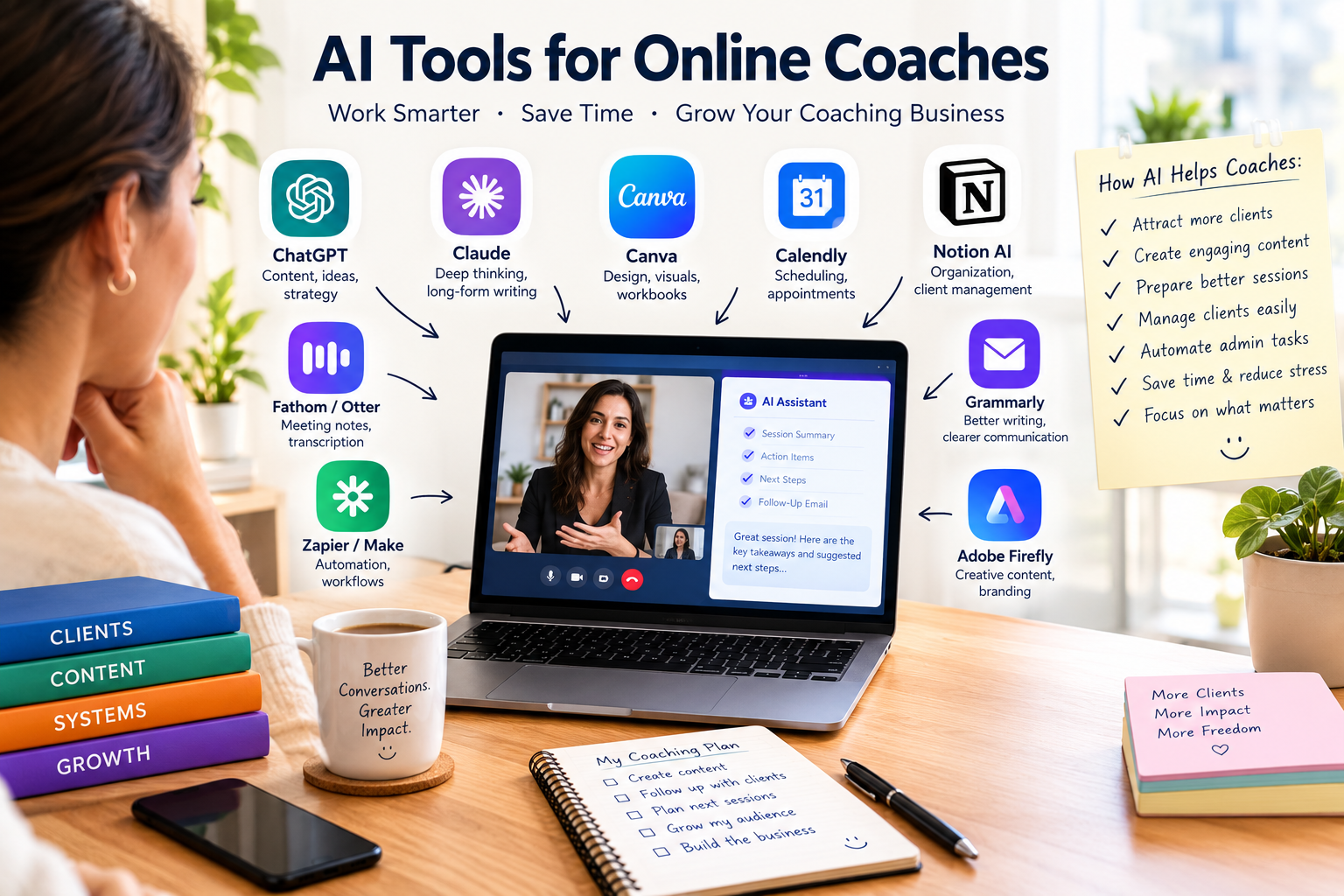
For general-purpose work, ChatGPT and Claude are strong choices for brainstorming, writing, session preparation and creating coaching resources.
For organization and client knowledge management, Notion AI can be useful.
For visual content, workbooks and social media graphics, Canva AI is a strong option.
For scheduling, Calendly can reduce back-and-forth communication.
For meeting transcription and summaries, tools such as Notion AI, Fathom, Fireflies or Otter can help capture important information.
For automation, Zapier and Make can connect different parts of your coaching business.
The key is not to collect as many AI tools as possible. A small stack that solves your biggest bottlenecks is usually more useful than a collection of dozens of overlapping apps.
What Are AI Tools for Online Coaches?
AI tools for online coaches are software applications that use artificial intelligence to help coaches perform business, marketing, administrative, content and client-support tasks.
These tools can assist with activities such as:
- Writing emails
- Creating social media content
- Preparing coaching sessions
- Summarizing meeting notes
- Creating coaching worksheets
- Researching topics
- Developing online courses
- Creating presentations
- Scheduling appointments
- Following up with leads
- Organizing client information
- Automating repetitive tasks
- Analyzing business information
- Creating marketing campaigns
Some tools are general-purpose AI assistants, while others are designed specifically for coaching, meetings, scheduling or business management.
The most effective approach is usually to combine a general AI assistant with a few specialized tools.
Why Should Online Coaches Use AI?
The biggest benefit of AI isn’t that it makes coaching automatic.
The benefit is that it can reduce the amount of time you spend on tasks that don’t require your direct coaching expertise.
Imagine a coach who spends several hours every week:
- Writing newsletters
- Creating Instagram posts
- Preparing session questions
- Writing follow-up emails
- Summarizing meetings
- Building worksheets
- Researching topics
- Organizing notes
AI can help accelerate many of these tasks.
That gives the coach more time for activities that directly affect the business:
- Coaching clients
- Building relationships
- Sales conversations
- Improving the coaching program
- Networking
- Developing expertise
- Creating a better client experience
OpenAI’s current guidance, for example, describes AI as useful for writing, brainstorming, research, planning and organizing information rather than as a replacement for professional judgment.
The same principle applies to coaching.
Use AI to reduce administrative friction, not to remove the human element from coaching.
15 Best AI Tools for Online Coaches
1. ChatGPT — Best Overall AI Tool for Coaches
ChatGPT is one of the most versatile AI tools for an online coaching business.
A coach can use it for almost every stage of the business.
What coaches can use ChatGPT for
You can use it to:
- Brainstorm content ideas
- Write newsletters
- Draft emails
- Create social media posts
- Develop coaching exercises
- Create worksheets
- Prepare session questions
- Build course outlines
- Create lead magnets
- Research audiences
- Develop offers
- Improve website copy
- Write sales-page drafts
- Create FAQs
- Analyze business data
- Repurpose long-form content
For example, instead of asking:
“Give me Instagram ideas.”
Give the AI more context:
“I am a career coach helping mid-career professionals transition into higher-paying jobs. Create 20 Instagram content ideas addressing the biggest fears, mistakes and questions my audience has.”
The second prompt gives the AI a specific audience and business context.
That usually produces much more useful results.
ChatGPT can also be used as a brainstorming and planning partner, helping coaches move from ideas to structured plans.
Best for: General coaching business tasks
2. Claude — Best for Long Documents and Deep Thinking
Claude is another powerful general-purpose AI assistant.
It can be particularly useful when you work with longer documents or want help structuring complex material.
Online coaches can use it for:
- Coaching program development
- Long-form guides
- Course creation
- Workshop development
- Client-resource drafts
- Research summaries
- Policy documents
- Book or ebook outlines
- Detailed content planning
- Reviewing large amounts of text
For example, you could provide your existing coaching curriculum and ask AI to identify:
- Missing lessons
- Repeated concepts
- Weak transitions
- Exercises that could be improved
- Potential FAQs
- Additional resources clients may need
The important point is to treat AI output as a draft or analytical aid rather than automatically accepting every recommendation.
Best for: Long-form coaching materials and complex projects
3. Notion AI — Best for Organizing a Coaching Business
Notion can become the central workspace for an online coaching business.
With Notion AI, coaches can combine information management with AI-assisted writing, research and meeting documentation.
Notion’s current AI features include workspace search, writing assistance, research functions and AI Meeting Notes. Its meeting functionality can transcribe conversations, summarize them and identify important points and action items.
A coach could create a workspace containing:
- Client profiles
- Coaching goals
- Session notes
- Action plans
- Content calendar
- Course materials
- SOPs
- Marketing plans
- Lead information
- Business goals
You can then build a repeatable system around your coaching practice.
For example:
Client → Discovery Call → Onboarding → Session → Action Items → Follow-Up → Progress Review
Instead of keeping everything in scattered documents, your information can be organized into a central system.
Best for: Organization, client information and knowledge management
4. Canva AI — Best for Coaching Content and Visuals
Online coaches need visual content.
You may need:
- Instagram posts
- LinkedIn graphics
- Presentation slides
- Coaching workbooks
- PDFs
- Lead magnets
- Course graphics
- YouTube thumbnails
- Social media carousels
- Infographics
Canva’s AI ecosystem can help simplify much of this work.
Canva has expanded its AI capabilities into conversational design, content generation, brand workflows and other creative tasks.
For example, a fitness coach could create a:
“7-Day Beginner Fitness Challenge”
and use Canva to turn the content into:
- A branded PDF
- Instagram graphics
- A carousel
- A checklist
- A presentation
This allows one piece of expertise to become multiple marketing and client-delivery assets.
Best for: Workbooks, social graphics and visual coaching materials
5. Calendly — Best for Scheduling
Scheduling can become surprisingly time-consuming.
A client sends:
“When are you available?”
You reply with several options.
They choose one.
Then they need to reschedule.
Then you confirm.
A scheduling platform can remove much of that back-and-forth.
Calendly has expanded beyond basic scheduling, with newer AI capabilities designed to support work around meetings. Its 2026 updates include AI-assisted meeting functionality and integrations that allow AI tools to interact with scheduling workflows.
For an online coach, a simple booking system can connect:
Lead → Booking → Confirmation → Reminder → Meeting → Follow-Up
This creates a much smoother client experience.
Best for: Discovery calls and client scheduling
6. Fathom — Best for AI Meeting Notes
Coaching conversations can contain a lot of information.
Instead of trying to write every detail manually, an AI meeting assistant can help capture the conversation and produce a useful summary.
For coaches, meeting intelligence tools can potentially help with:
- Session summaries
- Action items
- Key discussion points
- Follow-up preparation
- Reviewing previous conversations
This can be especially valuable when you conduct many online sessions each week.
However, recording or transcribing coaching conversations requires careful attention to client consent and applicable privacy requirements.
Best for: Session documentation and meeting summaries
7. Fireflies.ai — Best for Meeting Intelligence
Fireflies is another option for capturing and analyzing conversations.
A coach may use a meeting assistant to help organize:
- Client calls
- Discovery calls
- Team meetings
- Workshops
- Interviews
- Business conversations
The biggest advantage is searchable information.
Instead of thinking:
“What did that client say three weeks ago?”
you may be able to search your meeting records for relevant information.
This can make follow-up and preparation more efficient.
Best for: Conversation capture and searchable meeting history
8. Otter.ai — Best for Transcription
Otter is another popular transcription-focused option.
For coaches who conduct webinars, workshops, interviews or online meetings, transcription can turn conversations into text that can later be reviewed or repurposed.
For example:
One coaching workshop
could potentially become:
- A transcript
- A blog post
- Five social media posts
- An email newsletter
- A client worksheet
- A list of FAQs
That is a powerful content-repurposing workflow.
Best for: Transcription and repurposing spoken content
9. Zapier — Best for AI Automation
Zapier becomes particularly useful when your coaching business has repetitive workflows.
For example:
New client books a session
↓
Add client to CRM
↓
Send welcome email
↓
Create client workspace
↓
Create task list
↓
Send intake form
↓
Add appointment to calendar
A coach shouldn’t necessarily have to perform every one of these steps manually.
Automation platforms can connect different applications so that one action triggers another.
You can also build workflows around:
- New leads
- Bookings
- Email subscribers
- Payments
- Client onboarding
- Follow-ups
- Content publishing
- Forms
Best for: Connecting your coaching software and automating repetitive tasks
10. Make — Best for More Advanced Automation
Make is another automation platform, but it can be particularly useful when you want more sophisticated workflows.
For example, you might create a system where:
Client completes intake form
→ Information is organized
→ AI summarizes the intake
→ Client profile is created
→ Coach receives a briefing
→ Initial session questions are prepared
→ Follow-up task is created
This is much more advanced than simply connecting two apps.
For coaches who are comfortable with automation, tools like Make can become the foundation of an AI-powered back office.
Best for: Advanced automation
11. Grammarly — Best for Client Communication
Coaches send a huge number of written messages.
Emails.
Newsletters.
Follow-ups.
Proposals.
LinkedIn messages.
Website copy.
Course materials.
Grammarly can help improve clarity, tone and grammar.
This is especially useful when your coaching brand needs to sound professional and consistent.
For example, you can draft an email quickly and then use AI assistance to make it:
- Warmer
- More concise
- More professional
- More persuasive
- Easier to understand
The goal isn’t to make every message sound robotic.
Your personality should remain in the communication.
Best for: Polishing client-facing writing
12. Perplexity — Best for Research
Coaches frequently need to research:
- Industry trends
- Client problems
- Market opportunities
- Competitors
- Statistics
- New concepts
- Content topics
AI-powered research tools can accelerate the process.
Perplexity can be useful when you want to explore a topic and find sources quickly.
For example, a business coach could research:
“What are the biggest leadership challenges for first-time managers in 2026?”
Then use the findings as a starting point for:
- LinkedIn content
- Workshops
- Coaching exercises
- Newsletter topics
- Lead magnets
Always verify important claims before publishing them or using them in professional advice.
Best for: Fast research and source discovery
13. Adobe Firefly — Best for Creative AI
Coaches increasingly need original visuals for marketing.
Adobe’s AI tools can help with creative production such as:
- Marketing graphics
- Image concepts
- Visual assets
- Campaign ideas
- Branded creative work
This can be useful for coaches who want more sophisticated visual content than basic social media templates.
Best for: Advanced creative content
14. Gemini — Best for Google-Centered Workflows
If your coaching business relies heavily on Google’s ecosystem, Gemini can be worth considering.
It can be useful for workflows involving:
- Google Docs
- Gmail
- Research
- Brainstorming
- Content creation
- Data and documents
The advantage of using an AI tool that fits naturally into your existing ecosystem is that you may not need to move information between as many applications.
Best for: Coaches heavily invested in Google Workspace
15. AI-Powered Coaching Platforms — Best for Coaching-Specific Workflows
General-purpose AI tools aren’t always enough.
Some coaching businesses may benefit from dedicated coaching platforms that include features such as:
- Client management
- Goals
- Accountability
- Session tracking
- Client portals
- Worksheets
- Progress tracking
- Communication
- Scheduling
The advantage is that these platforms are designed around coaching workflows instead of forcing a general-purpose AI tool to do everything.
The market is increasingly moving toward hybrid human-AI coaching systems, but this is also where privacy, transparency and professional responsibility become particularly important.
Best for: Coaches who want specialized coaching-business infrastructure
Best AI Tools for Different Types of Online Coaches
Not every coach needs the same technology stack.
| Type of Coach | Useful AI Tools |
|---|---|
| Life Coach | ChatGPT, Notion AI, Calendly, Canva |
| Business Coach | ChatGPT, Claude, Perplexity, Notion AI |
| Career Coach | ChatGPT, Claude, Canva, Calendly |
| Executive Coach | Claude, Notion AI, meeting-note tools |
| Fitness Coach | ChatGPT, Canva, scheduling and client-management tools |
| Health Coach | ChatGPT, Notion, Canva, scheduling tools |
| Marketing Coach | ChatGPT, Canva, Perplexity, automation tools |
| Sales Coach | ChatGPT, meeting intelligence, CRM/automation tools |
| Leadership Coach | Claude, ChatGPT, Notion AI, meeting tools |
| Online Course Coach | ChatGPT, Canva, Notion AI, automation tools |
The important thing is to select tools according to your workflow rather than copying another coach’s software stack.
How Online Coaches Can Use AI at Every Stage of the Client Journey
One of the most effective ways to use AI is to organize your tools around the client journey.
Stage 1: Attract
Use AI to create:
- Social media posts
- Blog articles
- YouTube scripts
- Lead magnets
- Email newsletters
- Educational content
For example, one coaching topic could become a week’s worth of content.
Stage 2: Capture Leads
AI can help you create:
- Landing-page copy
- Lead magnets
- Email sequences
- Qualification questions
- FAQs
- Social CTAs
Instead of simply posting:
“Book a call with me.”
you can create a more targeted lead-generation system.
Stage 3: Book Discovery Calls
Use a scheduling system to allow prospects to choose available times without sending multiple messages.
You can then automate:
- Confirmation emails
- Reminders
- Intake forms
- Calendar events
Stage 4: Prepare for the Call
AI can help organize information from:
- Intake forms
- Previous conversations
- Client goals
- Research
- Notes
You can ask AI to create a briefing such as:
Client goals
Current challenges
Important questions
Potential areas to explore
Information requiring clarification
This can help you enter the conversation prepared.
Stage 5: Conduct the Coaching Session
AI should generally remain a support system rather than becoming the coach.
Your job is to:
- Listen
- Ask questions
- Notice patterns
- Challenge assumptions
- Facilitate reflection
- Apply professional judgment
- Maintain the coaching relationship
AI can support documentation and preparation around that work.
The human relationship remains critical to coaching, and current coaching research specifically highlights trust, ethics and process integrity when AI enters the coaching relationship.
Stage 6: After the Session
This is where AI can save substantial administrative time.
A post-session workflow could look like:
Session ends
↓
AI creates a draft summary
↓
Action items are identified
↓
Coach reviews everything
↓
Client receives a personalized follow-up
↓
Next session preparation begins
The coach should always review AI-generated summaries before sending them to a client.
Stage 7: Between Sessions
AI can help coaches prepare:
- Reflection questions
- Homework ideas
- Journaling prompts
- Educational resources
- Accountability reminders
- Exercises
But coaches should be careful about allowing AI to independently give advice that could cross professional boundaries.
For example, a health or mental-health-related coach should be especially cautious about using generic AI output as if it were professional diagnosis or treatment.
Stage 8: Create More Content From Your Expertise
One of the biggest opportunities for online coaches is content repurposing.
Imagine you record a 30-minute workshop.
From that one workshop, AI could help you create:
- One blog post
- One newsletter
- Five LinkedIn posts
- Ten short social posts
- A YouTube script
- A checklist
- A client worksheet
- Frequently asked questions
You still provide the expertise.
AI helps package it into different formats.
How to Use AI to Get More Coaching Clients
AI isn’t only useful after someone becomes a client.
It can also support your marketing.
Create a Content Strategy
Ask AI to analyze your niche and create content pillars.
For example, a career coach might use:
- Career growth
- Interview skills
- Salary negotiation
- Leadership
- Workplace confidence
Then create content around each pillar.
Create Better Lead Magnets
Instead of a generic PDF, create something highly specific.
Examples:
- “The 30-Day Career Change Checklist”
- “10 Questions to Ask Before Starting a Business”
- “First-Time Manager Survival Guide”
- “7-Day Confidence Challenge”
AI can help outline and draft these resources, while your expertise makes them genuinely useful.
Improve Email Marketing
AI can help create:
- Welcome sequences
- Educational emails
- Case-study emails
- Promotional emails
- Re-engagement campaigns
- Consultation follow-ups
But don’t let AI make your marketing sound like everyone else’s.
Your experiences, stories and point of view are what differentiate you.
How to Use AI to Save Time as an Online Coach
A useful rule is:
Automate repetition. Keep expertise human.
For example:
| Task | AI Potential |
|---|---|
| Brainstorming | High |
| First drafts | High |
| Social content repurposing | High |
| Meeting transcription | High |
| Scheduling | High |
| Email formatting | High |
| Research | Medium to high |
| Session preparation | Medium to high |
| Client summaries | Medium to high |
| Coaching judgment | Human |
| Relationship building | Human |
| Sensitive decisions | Human review |
| Professional diagnosis | Appropriate qualified professional |
This distinction prevents coaches from over-automating the part of their business that clients actually pay for.
Best Free AI Tools for Online Coaches
If you’re just starting, you don’t need an expensive AI stack.
A simple starter setup could include:
ChatGPT
For brainstorming, writing, planning and general business assistance.
Canva
For social media graphics and coaching resources.
Calendly
For appointment scheduling.
Notion
For organizing business information and client workflows.
A meeting transcription tool
Choose one that fits your budget and workflow.
Start with free or low-cost versions where practical.
Only upgrade when a tool is saving enough time or creating enough business value to justify the cost.
The Best AI Stack for a Solo Online Coach
If you are a solo coach, I would avoid subscribing to 10–15 different tools.
Start with a small stack.
Beginner AI Stack
ChatGPT + Canva + Calendly + Notion
This covers:
- Content
- Writing
- Brainstorming
- Visuals
- Scheduling
- Organization
Growing Coaching Business
Add:
Meeting transcription + automation
This gives you:
- Session documentation
- Automated workflows
- Better follow-up
- Less administrative work
Advanced Coaching Business
Consider adding:
Research + CRM + advanced automation + specialized coaching software
The goal is to build an ecosystem where information moves smoothly from one stage to another.
How Much Can AI Save an Online Coach?
There is no universal number.
The amount of time saved depends on:
- Number of clients
- Number of sessions
- Amount of content produced
- Administrative workload
- Existing systems
- Number of repetitive tasks
- How well the tools are configured
Instead of asking:
“How many hours will AI save me?”
ask:
“Which tasks repeatedly consume my time without requiring my unique expertise?”
Then start there.
For example, if you spend three hours every week creating social content, that is an obvious workflow to improve.
If you spend ten minutes scheduling appointments, automation may not be your biggest priority.
AI Tools for Online Coaches: Common Mistakes to Avoid
1. Buying Too Many Tools
More tools don’t automatically mean more productivity.
Start with one problem.
Solve it.
Then expand.
2. Using Generic Prompts
AI output improves dramatically when you provide context.
Instead of:
“Write a coaching email.”
Try:
“Write a warm follow-up email for a career coaching client who completed their first action plan. Keep it under 180 words and encourage them to reflect on one specific win and one obstacle before our next session.”
Specific instructions produce more useful drafts.
3. Publishing AI Content Without Editing
AI-generated content can sound generic.
Always add:
- Personal experiences
- Client insights you can ethically share
- Your coaching philosophy
- Examples
- Stories
- Opinions
- Original frameworks
Your expertise should remain visible.
4. Sharing Sensitive Client Information Carelessly
This is one of the most important issues for coaches.
Client conversations can contain highly personal information.
Before entering client information into an AI system, understand:
- What information the tool stores
- How the information is processed
- What privacy controls exist
- Whether recordings are retained
- Whether transcripts are stored
- Who can access the information
- What your professional obligations require
The ICF’s AI framework specifically highlights confidentiality, privacy, bias and technical safeguards as important considerations for AI in coaching.
When possible, minimize personally identifiable information and use appropriate privacy controls.
5. Recording Sessions Without Appropriate Consent
If you record or transcribe coaching sessions, clients should know what is happening and provide whatever consent is required.
For example, Notion’s AI Meeting Notes workflow explicitly requires confirmation that everyone in the meeting has consented to recording and transcription.
Don’t assume that because a tool can record a conversation, you automatically have permission to record it.
6. Letting AI Become the Coach
AI can help with preparation.
AI can help with documentation.
AI can help with content.
AI can help with administrative work.
But clients often hire a coach because they want a human who understands context, listens carefully and challenges them appropriately.
Don’t automate away your competitive advantage.
Will AI Replace Online Coaches?
Probably not in the simple sense of “AI replaces every human coach.”
A more realistic future is a hybrid coaching model.
AI may handle:
- Administrative tasks
- Session summaries
- Scheduling
- Content
- Research
- Client reminders
- Progress tracking
- Between-session exercises
The human coach can focus more heavily on:
- Relationships
- Judgment
- Accountability
- Complex conversations
- Emotional nuance
- Personal experience
- Strategic thinking
- Professional boundaries
Current coaching research increasingly discusses AI as a participant or support layer within human coaching rather than simply treating it as a replacement for coaches.
How to Choose the Right AI Tools for Your Coaching Business
Before purchasing an AI tool, ask these seven questions.
1. What problem does it solve?
Don’t buy an AI tool just because it is popular.
2. How often will I use it?
A tool used every day can justify a subscription more easily than one used once a month.
3. Does it integrate with my existing workflow?
The best tool is often the one that works with the systems you already use.
4. Will it actually save time?
Estimate how much manual work it removes.
5. Does it improve the client experience?
Saving time is good.
Improving the client experience is even better.
6. What happens to client data?
Review privacy policies, permissions, retention and security controls before using AI with sensitive information.
7. Can I test it before paying?
Whenever possible, test the workflow first.
Don’t buy a year-long subscription before knowing whether the tool actually solves your problem.
A Simple AI Workflow for Online Coaches
Here’s an example of a practical AI-powered coaching workflow.
Before the client call
Calendly
Client books the appointment.
↓
Intake form
Client provides goals and background.
↓
AI assistant
Coach creates a preparation brief.
↓
Coach
Reviews the information and prepares questions.
During the call
Meeting platform + transcription
Conversation is recorded only with appropriate consent.
↓
AI creates a transcript and summary.
↓
Coach focuses on the conversation rather than constantly typing notes.
After the call
AI prepares a draft:
- Session summary
- Key insights
- Action items
- Follow-up email
↓
Coach reviews
Corrects anything inaccurate.
↓
Client
Receives personalized follow-up.
Between sessions
AI can help prepare:
- Reflection questions
- Educational material
- Exercises
- Content
↓
Coach reviews
↓
Client receives appropriate material.
Marketing
The coach takes one piece of expertise and repurposes it into:
- Blog
- Newsletter
- LinkedIn post
- Instagram carousel
- Video script
- Lead magnet
This creates a repeatable content engine.
A Practical AI Stack by Budget
$0–$Low Budget
Start with:
- ChatGPT free option
- Canva free option
- Calendly free option
- Notion/free workspace options
Focus on content, organization and scheduling.
Moderate Budget
Add:
- Paid AI assistant
- Meeting transcription
- Automation
- Advanced design features
Now focus on reducing repetitive administrative work.
Advanced Budget
Consider:
- Coaching management platform
- CRM
- Advanced automation
- Research tools
- AI meeting intelligence
- Specialized client-management systems
At this point, the goal is not simply to “use AI.”
The goal is to create an efficient operating system for your coaching business.
Frequently Asked Questions
What is the best AI tool for online coaches?
For most coaches, a general AI assistant such as ChatGPT is a strong starting point because it can support writing, brainstorming, planning, research and many other business tasks.
However, the best tool depends on your workflow.
Can AI help me get more coaching clients?
Yes.
AI can help with content planning, lead magnets, emails, social media, website copy, audience research and marketing workflows.
But AI does not replace your positioning, expertise or relationships.
What is the best AI tool for coaching session notes?
Meeting-intelligence tools such as Notion AI, Fathom, Fireflies and Otter can help with transcription and summaries.
Choose based on your preferred meeting platform, workflow, integrations and privacy requirements.
Can AI create coaching programs?
Yes.
AI can help brainstorm and structure:
- Modules
- Lessons
- Exercises
- Worksheets
- Reflection questions
- Assignments
- Email sequences
Your expertise should determine the final curriculum.
Can AI write social media content for coaches?
Yes.
AI can generate content ideas, captions, hooks, outlines and drafts.
The best results come when you provide your niche, target audience, voice, experience and unique perspective.
Are AI tools safe for coaching clients?
They can be useful, but safety depends on how they are used.
Coaches should consider privacy, consent, data handling, confidentiality, professional standards and applicable laws before using AI with client information.
The ICF has dedicated AI coaching standards addressing areas including ethics, confidentiality, privacy, communication and technical considerations.
Should coaches use AI during coaching sessions?
It depends on the purpose and the client’s expectations.
AI can assist with transcription and documentation, but coaches should consider whether using it affects the coaching relationship and should obtain appropriate consent when recording or transcribing.
Can AI replace a life coach?
AI can provide automated guidance and support, but human coaching involves relationships, judgment, context and professional boundaries.
For most professional coaches, AI is better viewed as an assistant and business-enablement layer rather than a complete replacement.
Final Verdict: What Are the Best AI Tools for Online Coaches?
The best AI tools for online coaches aren’t necessarily the tools with the most impressive AI features.
They’re the tools that remove the biggest bottlenecks from your business.
For most solo coaches, a practical starting stack is:
ChatGPT → content, writing and strategy
Canva → visual content and resources
Calendly → scheduling
Notion → organization and knowledge management
Meeting AI → notes and summaries
Zapier or Make → automation
From there, add specialized tools only when you have a clear reason.
The most important strategy is simple:
Use AI for repetitive work. Use your expertise for high-value work.
Let AI help you research, draft, organize, summarize, schedule and repurpose.
Then spend more of your time doing what clients actually hire you for: listening, thinking, challenging, supporting and coaching.
That is where AI becomes genuinely valuable—not when it tries to replace the coach, but when it gives the coach more time to be a coach.